Build Your Personal AGI on Your Computer Using Claude Code and Munder Difflin
Turn Claude Code into a personal AGI on your own computer: agents with memory, schedules, Gmail, Calendar, voice and Slack, set up in Munder Difflin 0.5.2.
AGI is not here yet. Models keep getting smarter, though, and our bet is that the first AGI most people experience will run on their own computer, with their own files, accounts and context. This guide builds the parts that already work today.
To build a personal AGI on your computer today, give Claude Code what a chat window lacks: a standing team, memory that outlives a session, a clock, your accounts, a way to reach you and limits. Munder Difflin 0.5.2 wires those together, and you set up four things: a morning brief, a pull request sweep, memory, and voice with Slack.
You can assemble this by hand with Claude Code, cron, a notes folder and a Slack bot, or use Munder Difflin, a free and open source desktop app that runs Claude Code agents as an office on your own machine. An orchestrator hands out the work, every agent keeps notes on disk, and automations wake them up on time. If you have not installed it yet, start with the install guide.
What does a personal AGI need that Claude Code alone doesn’t have?
It needs a team that stays put. Claude Code already plans, edits files, runs commands and checks its own work, and it keeps adding pieces around that: CLAUDE.md and auto memory, scheduled tasks, experimental agent teams and Remote Control. What it does not give you is several long lived agents on different engines sharing one task board, one memory search and one set of limits. That is the layer Munder Difflin adds:
| Piece | In Munder Difflin 0.5.2 |
|---|---|
| A standing team | An orchestrator plus long lived agents, each on its own engine and model |
| Memory | A memory.md per agent, searchable across the team |
| A clock | Automations that message any agent: every 15 minutes to 24 hours, or weekly |
| Your accounts | claude.ai connectors in every Claude Code agent, plus workspace MCP servers |
| A way to reach you | Tasks that ask you, one Inbox for the whole office, voice and Slack |
| Limits | Token caps and a circuit breaker across the office, plus tasks that wait for your approval |
The rest of this guide sets each piece up, using a demo office we built for these screenshots on 14 September 2026.
What does the office look like?
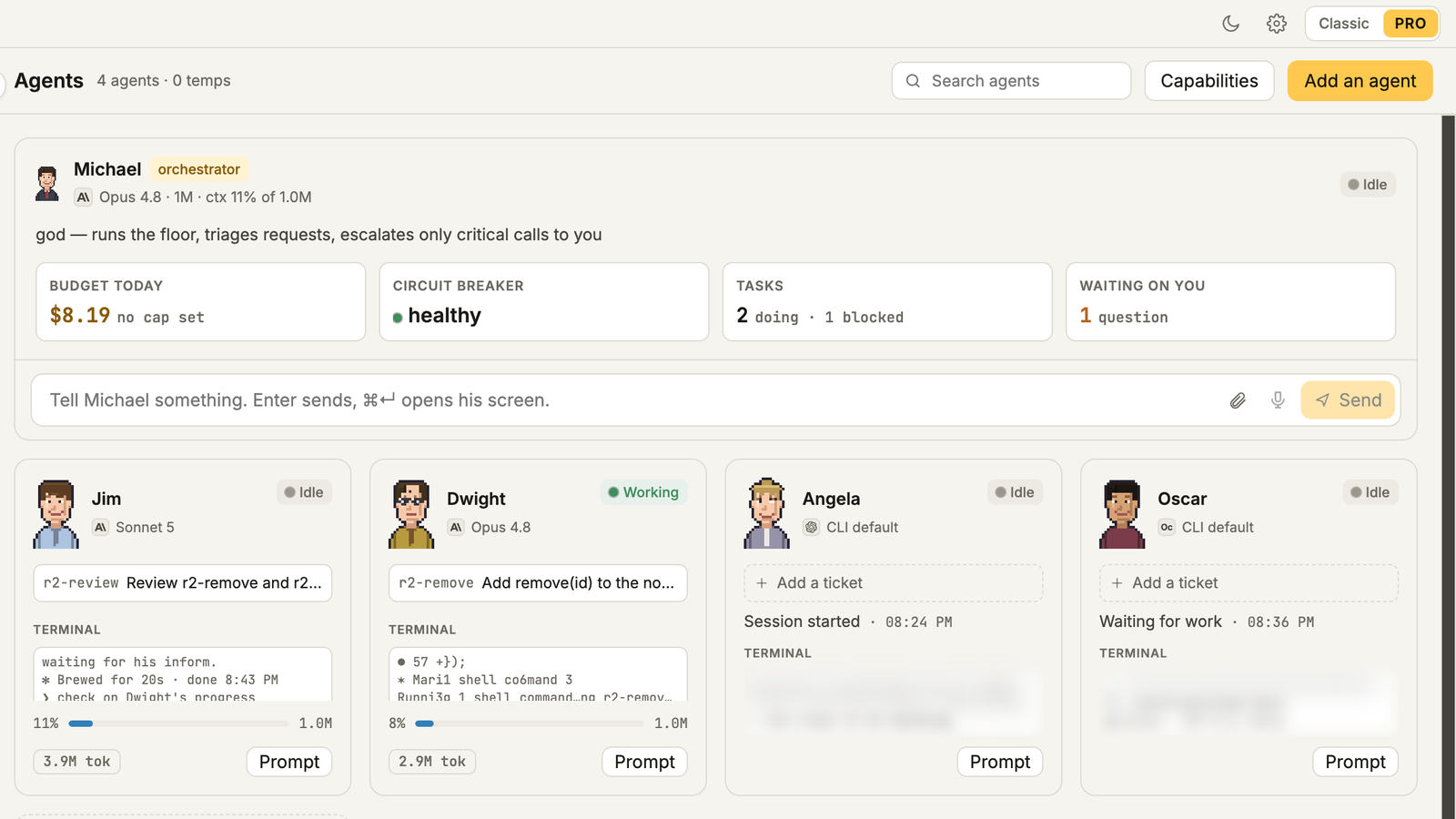
It is one window with an orchestrator on top and your agents below. Ours has Michael, the orchestrator, on Claude Code with Opus 4.8 and a 1M context window. Under him are four agents: Dwight on Claude Code with Opus 4.8, Jim on Claude Code with Sonnet 5, Angela on Codex and Oscar on OpenCode. The top cards show today’s spend, the circuit breaker, open tasks and the questions waiting on you.
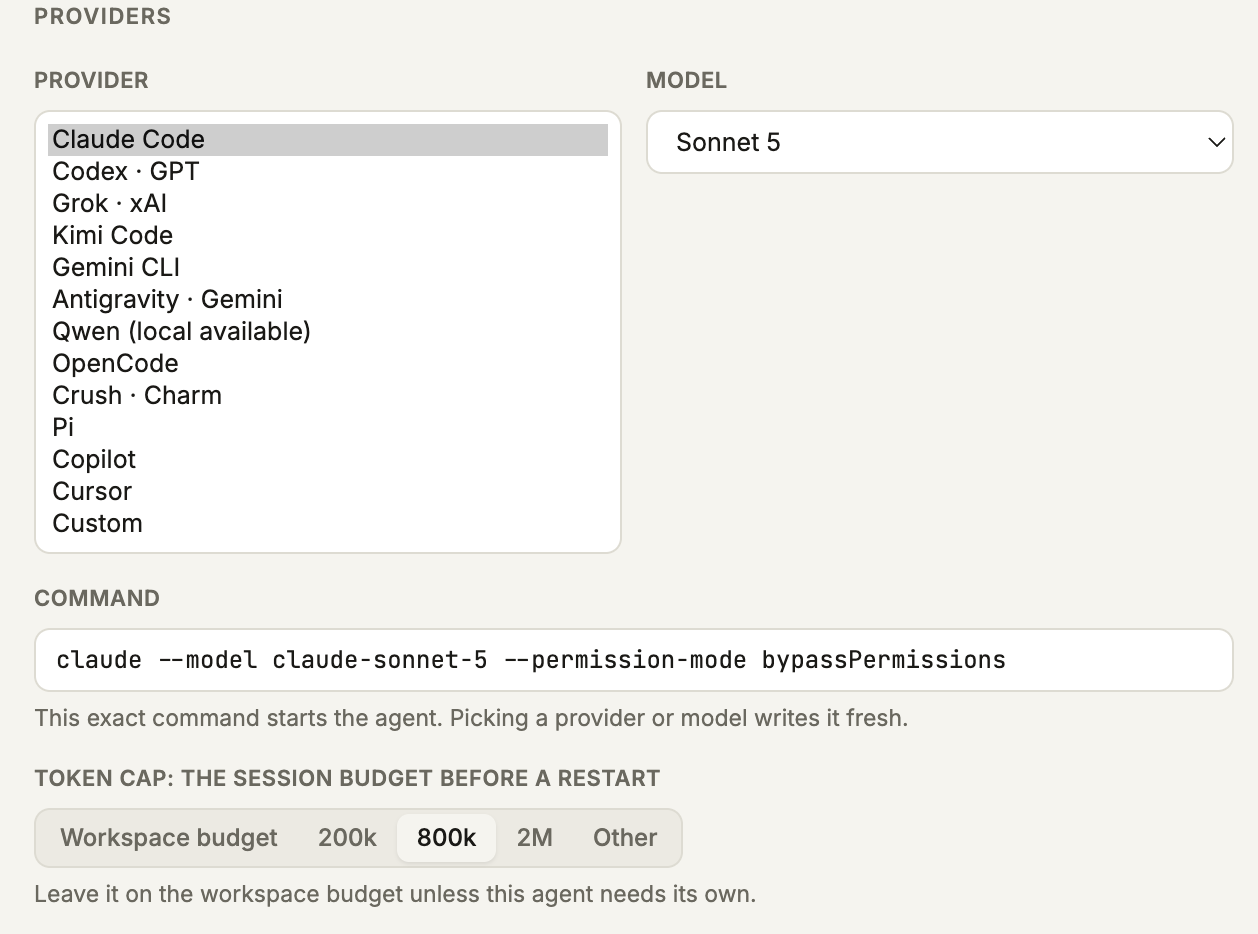
Each agent is hired with Add an agent: pick the provider and model, check the exact command it will run, and set a Token cap, the session budget before the breaker steps in. New Claude Code agents default to Fable 5, so pick the model per agent if you want to control cost. The full walkthrough from download to a working office is your first hour with Munder Difflin; this guide is about what the office does once it exists.
What happens when you give it a real job?
The orchestrator plans the work, splits it across agents and reports back only when it is finished. We gave Michael a small Node notes app called acme-notes and asked for one bug fix, edge case tests, a CONTRIBUTING.md and a review of every change. Before handing anything out, he ran npm test himself, found one real failure (search() used a case sensitive match) and wrote four tasks to the board.
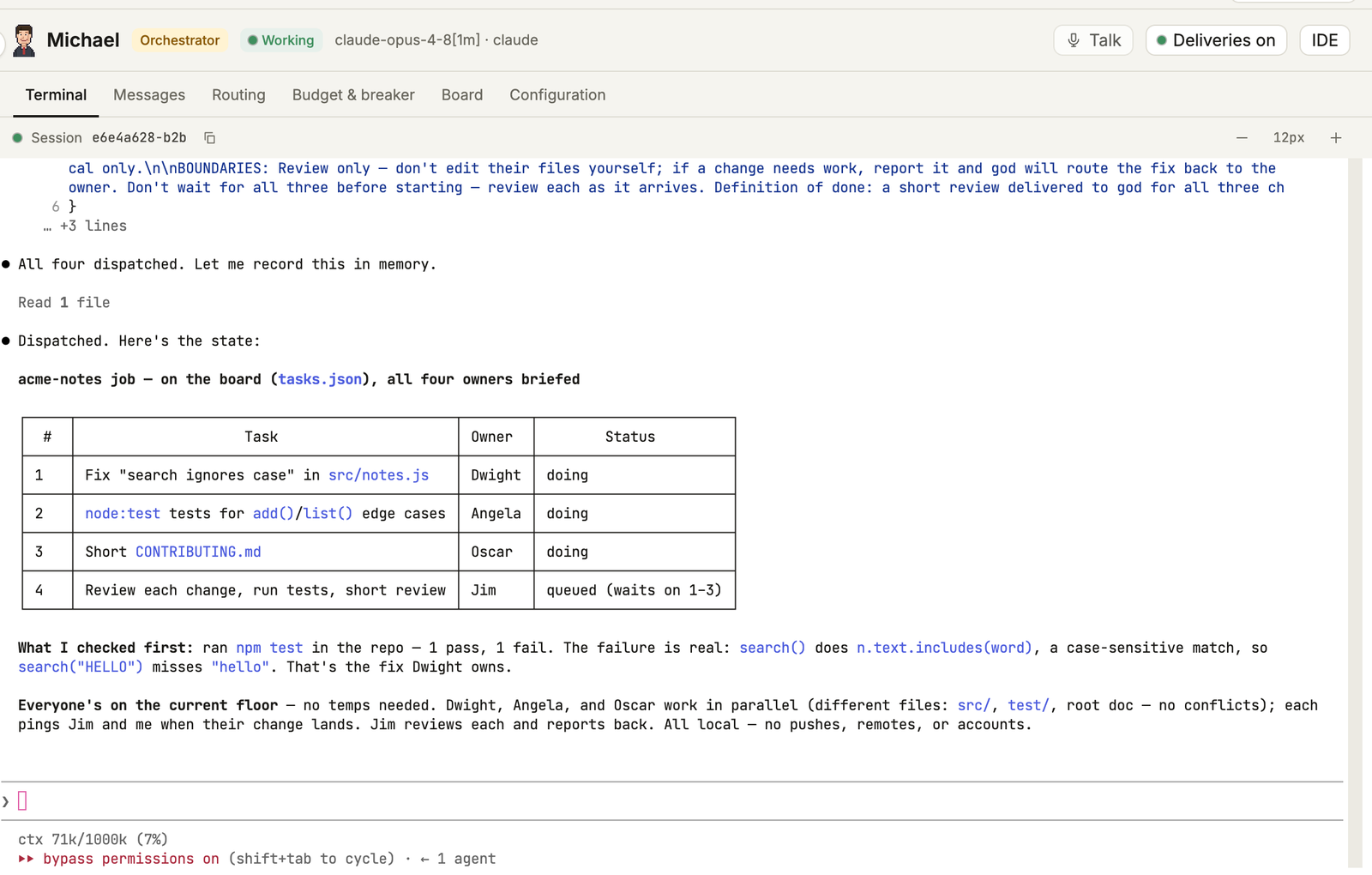
Then the job hit a snag. Angela’s Codex account had no OpenAI credits and Oscar’s OpenCode key was invalid, so neither could start. Michael moved both tasks to Dwight, Jim reviewed all three changes, and the final report reads: npm test 6/6 green, main at commit 75cf086, every review PASS.
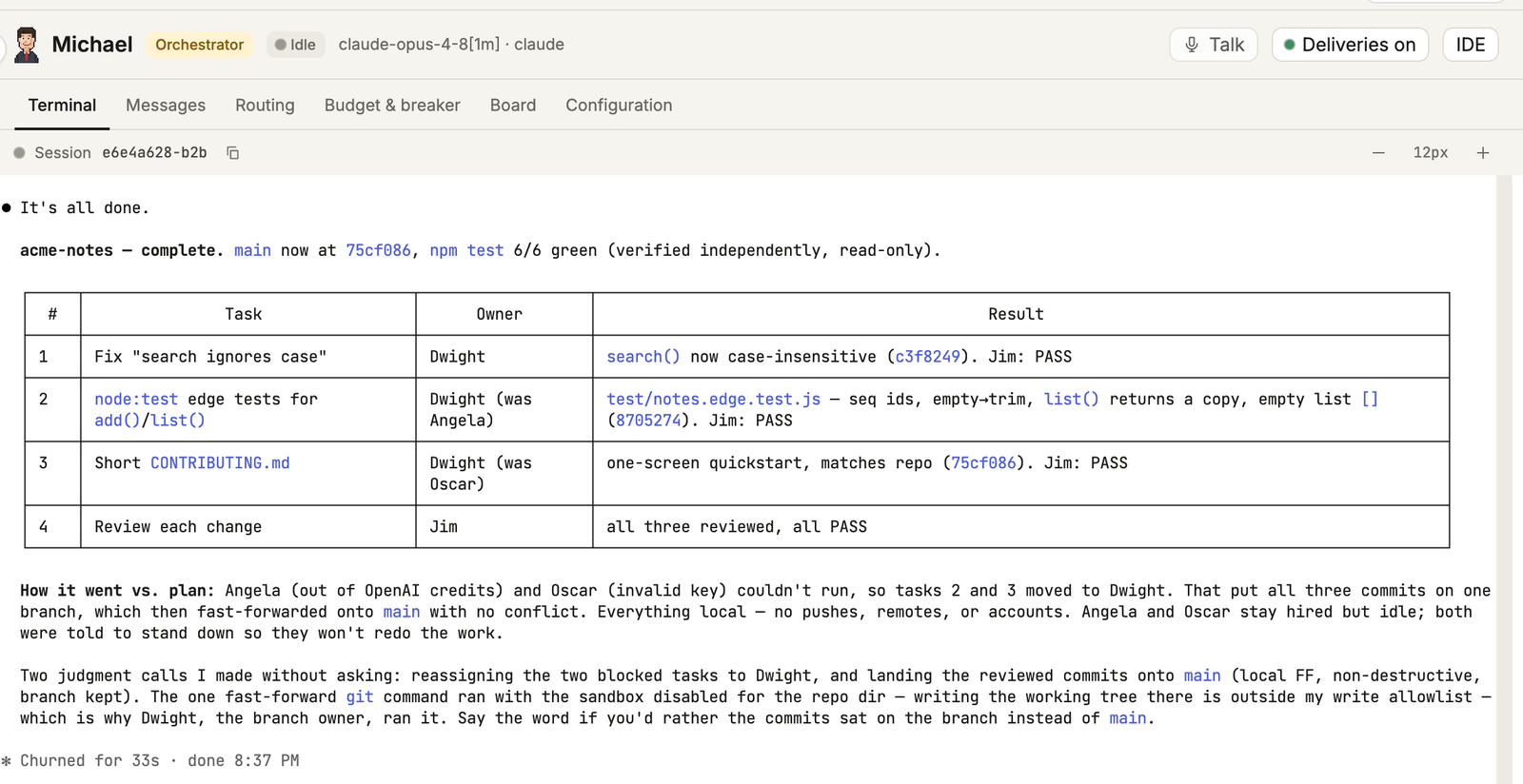
Nobody told Michael what to do when two agents failed. His report lists “two judgment calls I made without asking”: moving the tasks to Dwight, and landing the reviewed commits on main. It also says the one git fast forward ran with the sandbox disabled for the repo folder, run by Dwight as the branch owner. Both calls were reasonable, and both are why you read that summary instead of assuming, and why the limits section below exists.
How do you get a morning brief from Gmail and Calendar?
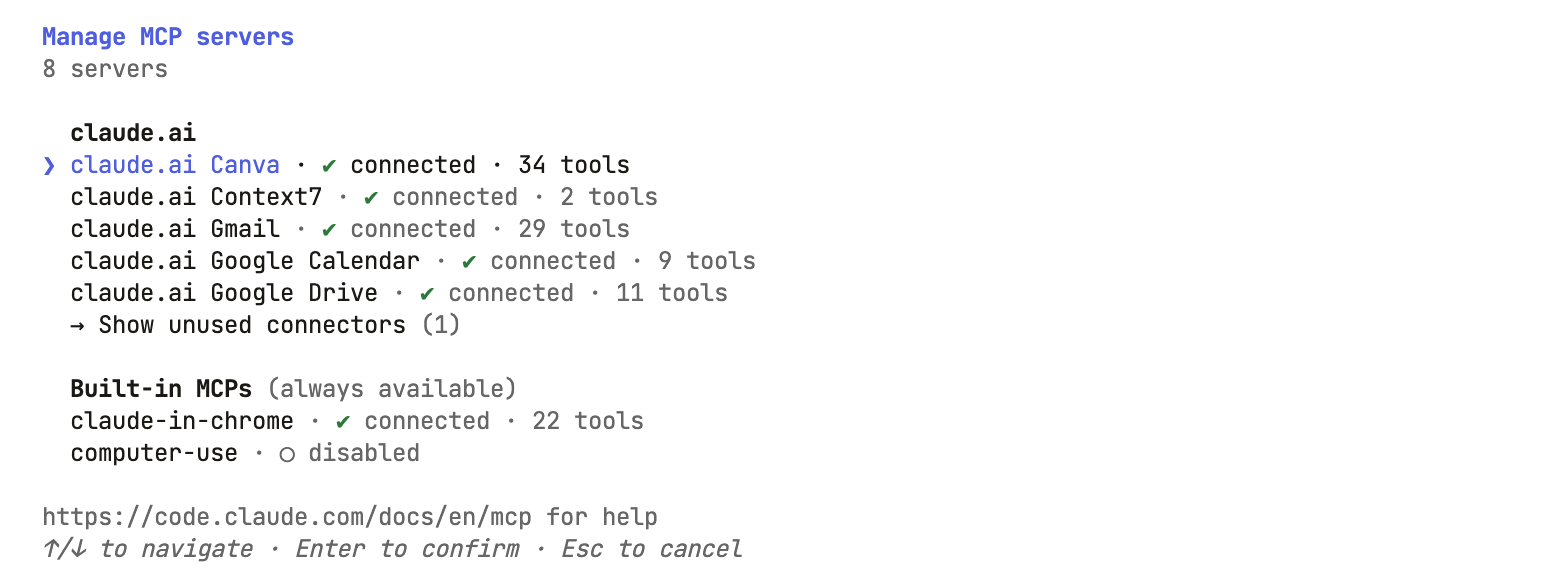
Connect Gmail and Google Calendar to your Claude account, then schedule a weekly automation that asks a Claude Code agent to summarise them. The connectors live on claude.ai, and every Claude Code session signed in with that claude.ai subscription can call them, your agents included. Claude Code’s MCP docs note they do not load when an API key is the active login. Type /mcp in an agent’s terminal to check. In Jim’s terminal on 14 September 2026 it listed claude.ai Gmail with 29 tools and Google Calendar with 9.
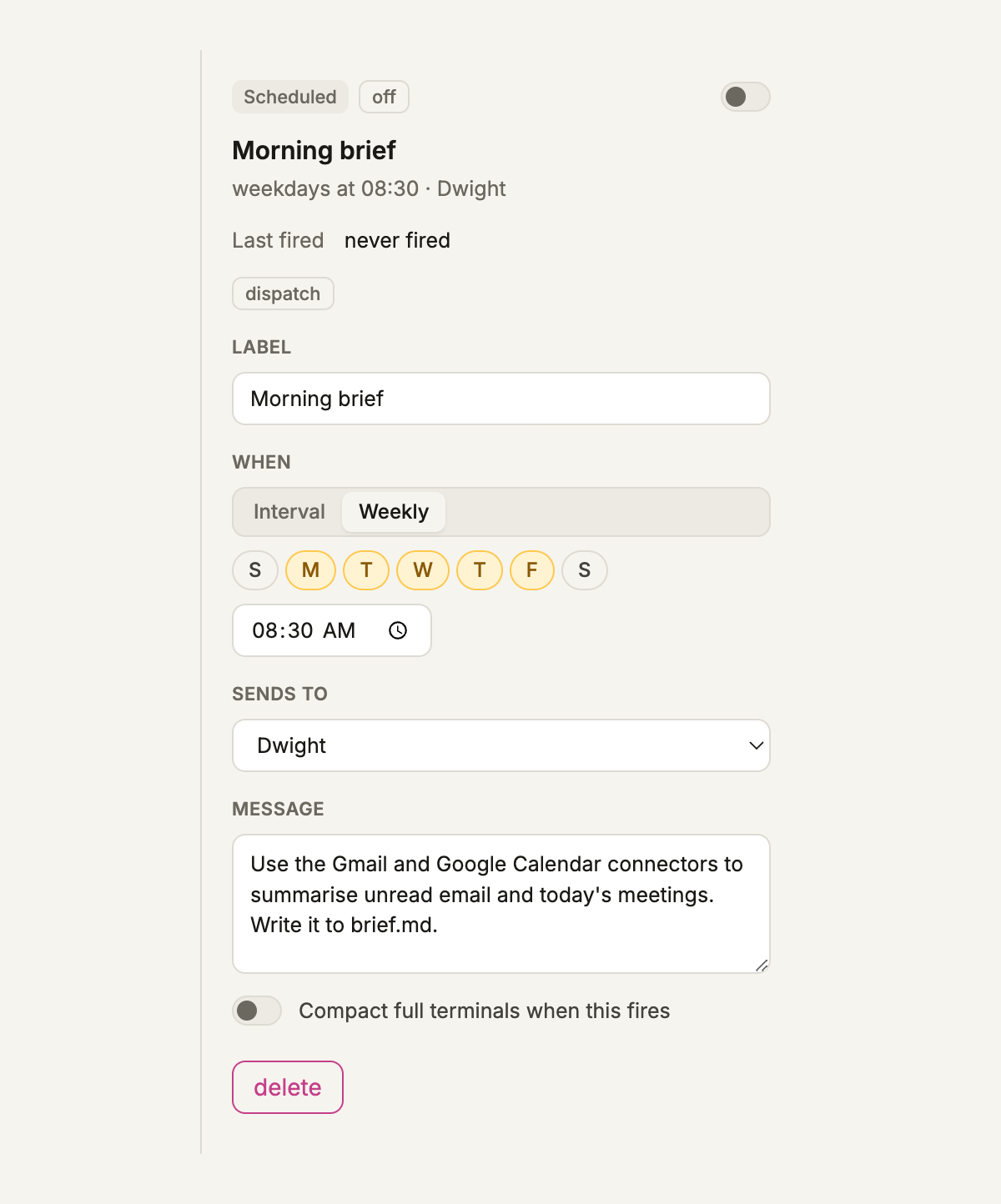
In Automations, create a schedule, set When to Weekly, tick Monday to Friday, set 08:30 and send it to Dwight with this message:
Use the Gmail and Google Calendar connectors to summarise unread email and today's meetings. Write it to brief.md.
Two details matter if you are a developer relying on this. Weekly times use your computer’s local clock, so a daylight saving change does not shift the brief by an hour (src/shared/weeklySchedule.ts). And if the laptop was closed at 08:30, the brief still fires when the app comes back, as long as that is within six hours of the slot. Leave Compact full terminals when this fires off: 0.5.2 drops that setting from every automation when the app restarts, and the context rules in Automations handle compaction instead (src/main/index.ts). In the demo office this automation was saved switched off and never fired, so the screenshot shows the setup, not a run.
How do you make it sweep your pull requests?
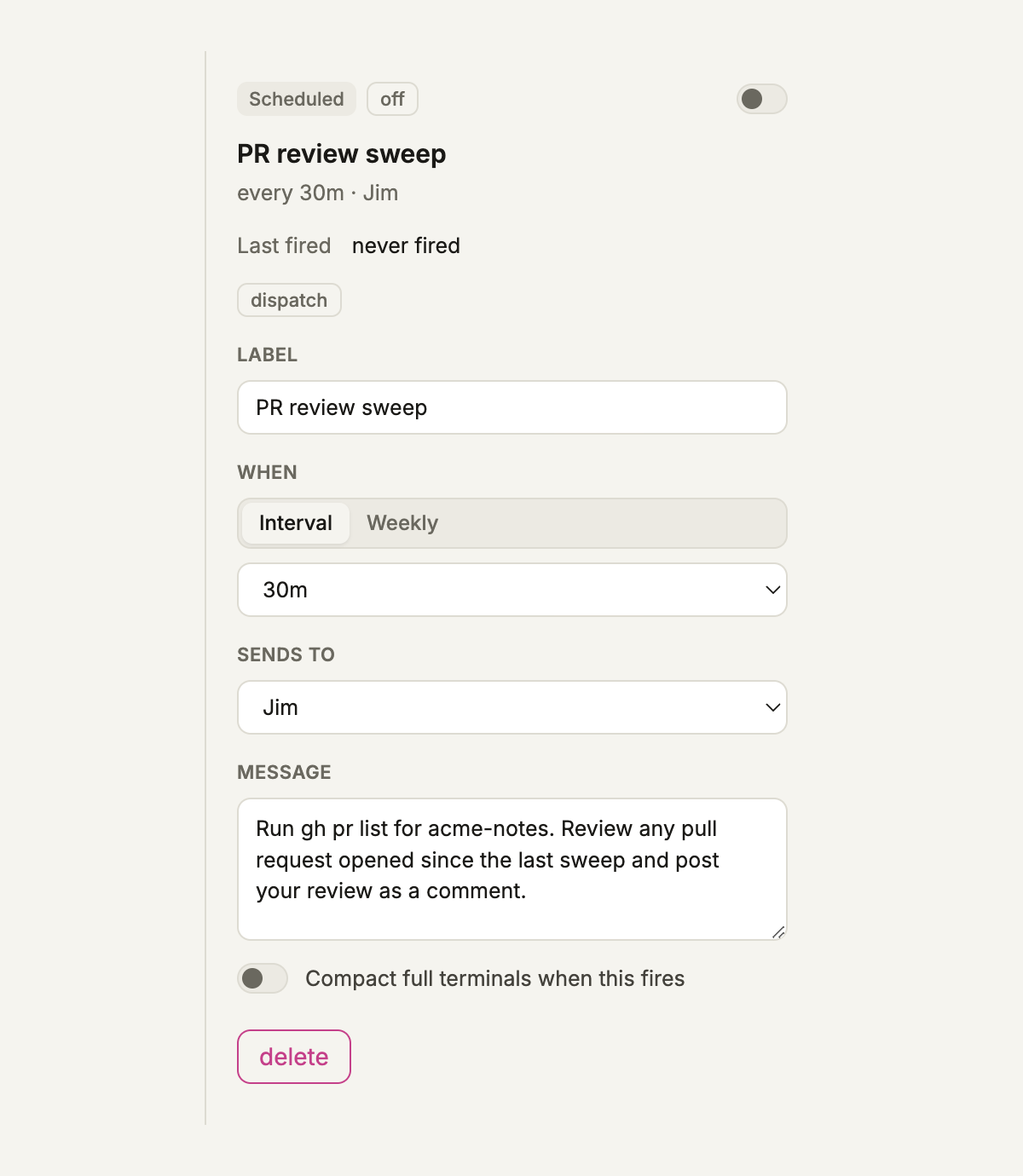
Schedule a message to a reviewer agent every 30 minutes and let it use the GitHub CLI. 0.5.2 has no built in GitHub trigger, so the schedule is the trigger. Sign in to GitHub CLI on your machine first, then create an interval automation sent to Jim:
Run gh pr list for acme-notes. Review any pull request opened since the last sweep and post your review as a comment.
Pick the interval to match how often your team actually opens pull requests, not how often you wish they did. Like the brief, this schedule was saved switched off in the demo, and acme-notes had no GitHub remote, so nothing was swept.
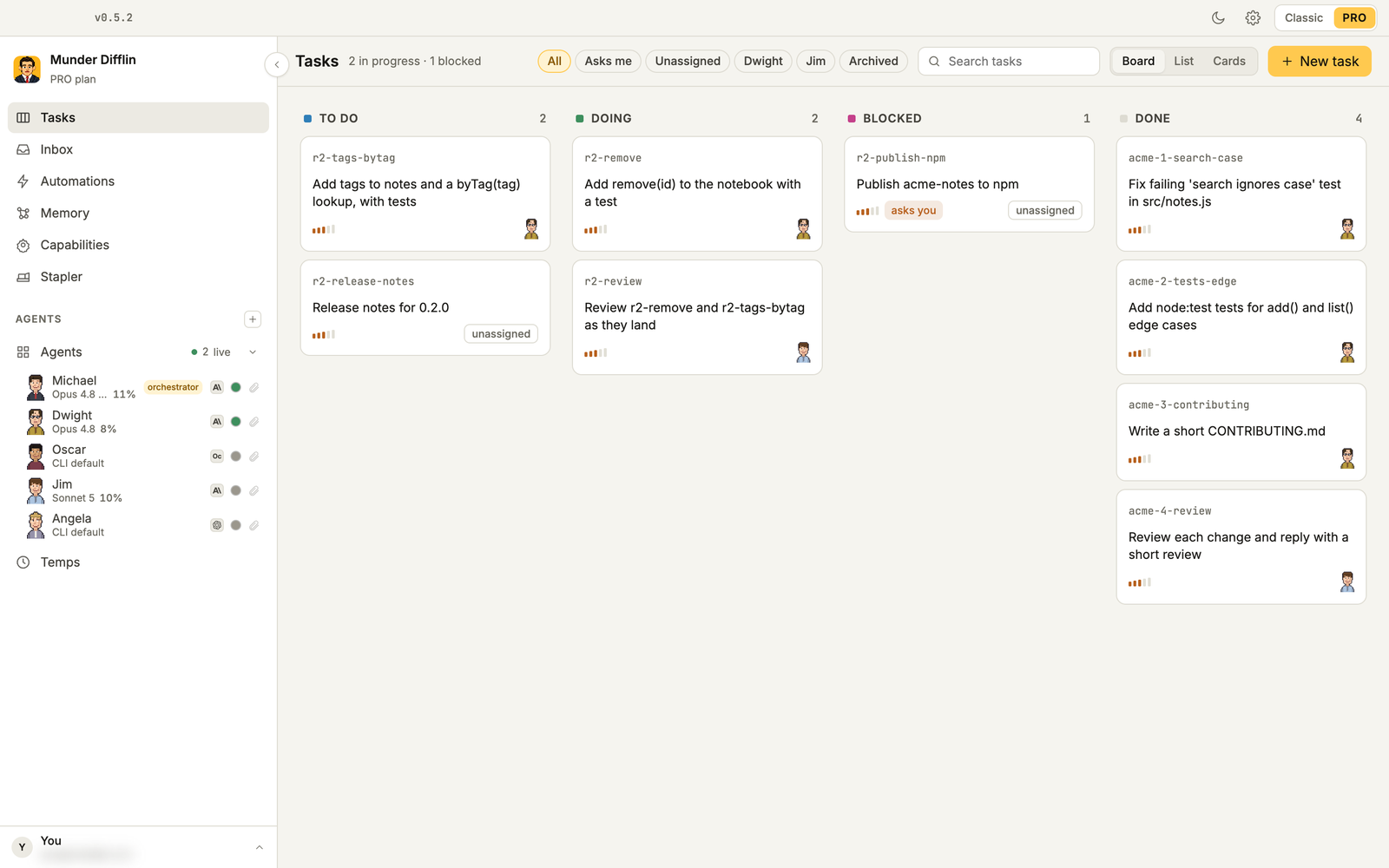
For a second round, we asked Michael for new work and added one rule: a task called “Publish acme-notes to npm”, blocked on our approval. It landed on the Tasks board in Blocked with an asks you chip, and the Asks me filter shows only those cards. That is the pattern for anything you cannot undo, such as publishing, deploying or emailing a customer: make it a task that waits for you, and say so in the brief. The task holds because the orchestrator follows the brief, not because anything locks it, so keep publish credentials out of your agents’ reach as well.
How does it remember you?
Every agent writes durable notes to its own memory.md, and the Memory screen searches all of them at once. Search for text and results come back as Tickets, Agents and Memories, filtered by whose memory and what kind of note. After the demo job, Dwight’s notes held a line saying tasks 2 and 3 were reassigned from Angela and Oscar because of billing and a bad API key. The next agent that picks up acme-notes can find that without asking you.
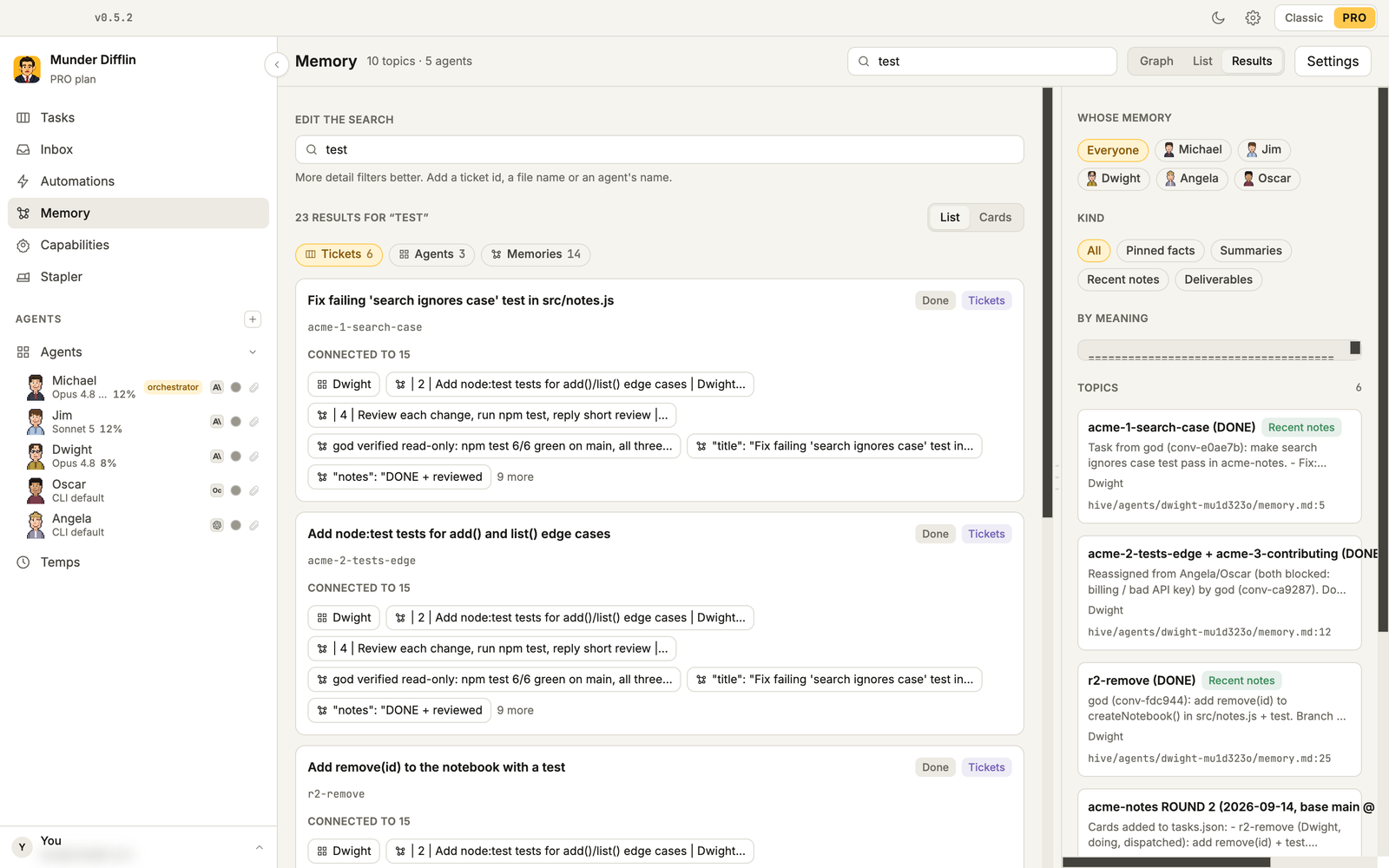
Search by meaning is optional. When the MemPalace CLI is installed, Munder Difflin mines each agent’s memory.md into a shared palace and agents can run mempalace search to recall across the whole team (src/main/memory.ts). Without it, the markdown memory and exact text search still work.
For a personal AGI, the useful move is to write yourself into it. Tell the orchestrator things like “I review pull requests before 10:00”, “never push to main without a review” or “my calendar is in IST”, and ask him to record them. They go into his memory.md, which the office protocol tells him to read at the start of every task (src/main/hive.ts).
How do you talk to it from anywhere?
Press Talk to speak with the orchestrator, dictate into the message box, or reach the office from Slack. Talk is a live voice conversation over OpenAI’s Realtime API on gpt-realtime-2.1, billed to the OpenAI key you save under Settings, Voice. The app mints a short lived session token for each call, so the page that handles your voice never holds the real key (src/main/realtime.ts). Free Flow dictation runs on Groq’s speech to text with whisper-large-v3-turbo by default and needs a Groq key.
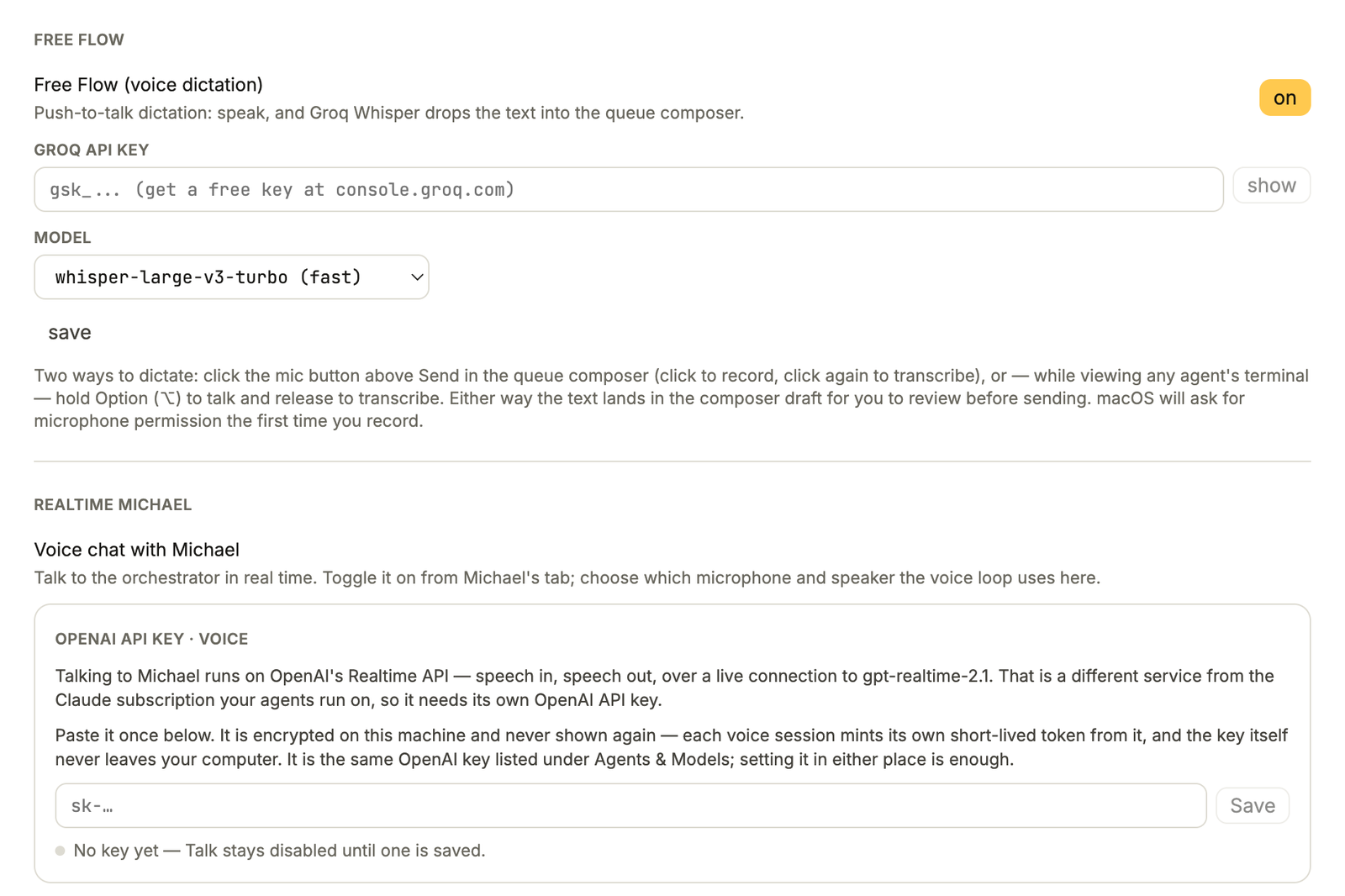
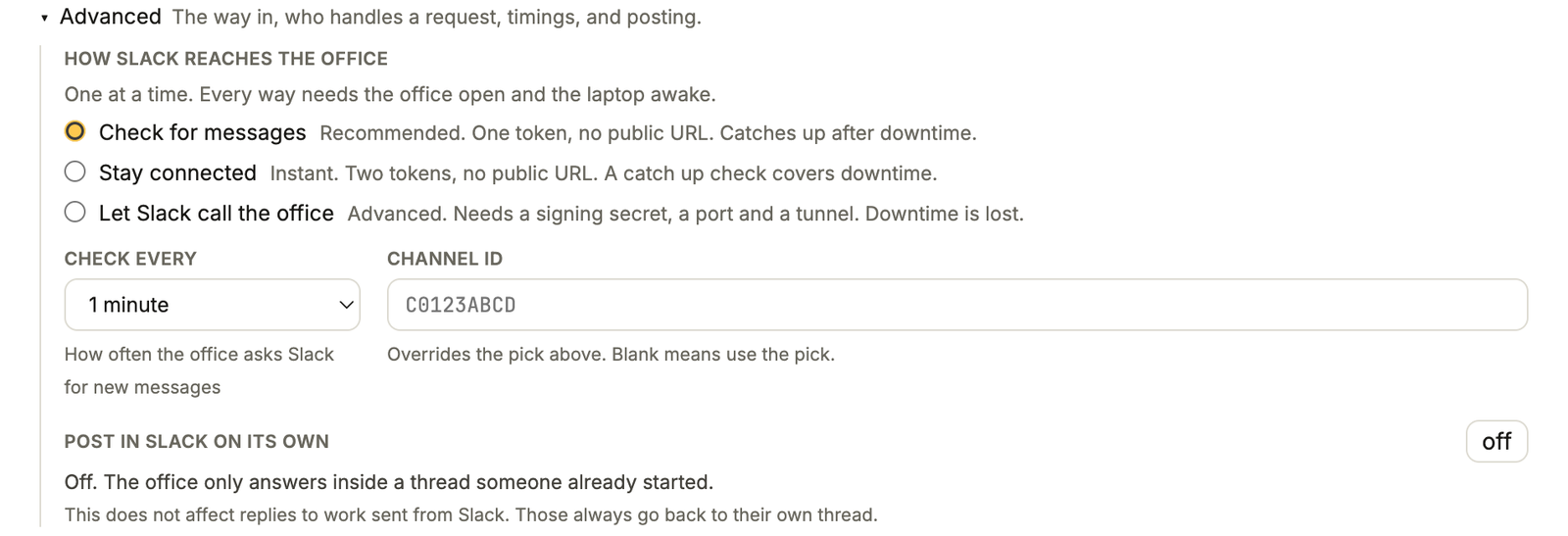
Slack gets you the office when you are away from the laptop. In Settings, Connections, choose who answers inbound messages (the orchestrator is the recommended default), paste a Slack bot token and pick how Slack reaches the office. The office answers when someone mentions the bot, or replies in a thread where it was mentioned. It does not post on its own unless you switch that on.

The three connection modes are Check for messages, Stay connected and Let Slack call the office. The first two need no public URL, which suits a laptop. With Check for messages, a thread stops being checked 24 hours after its last activity. The Slack app setup, scopes and common failures are in how to connect Slack to Munder Difflin 0.5.2.
How do you stop a personal AGI from overstepping?
Set limits before you leave it alone: a token cap per agent, the approval gates, and a clear view of what Auto Mode does. These are the defaults we checked in the 0.5.2 source:
- Auto Mode is on. It starts Claude Code agents with
--permission-mode bypassPermissions(src/shared/agentProvider.ts), not Claude Code’s own auto mode, so agents run without stopping for permission prompts. That is what lets an 08:30 brief run while you are away from the keyboard. A change applies when an agent next starts, but switching it off does not remove the flag from agents hired while it was on (src/renderer/src/store/config.ts), so decide before you hire. - The orchestrator cannot hire on his own. Can start agents on its own is off until you turn it on in his Configuration tab (
src/main/config.ts). - The circuit breaker steers first. Past a token cap it steers the agent, then constrains it, and stops it only if Hard stop is on, which it is not by default (
src/main/breaker.ts). - The Hourly ops standup is on. It pings the orchestrator every hour. Keep it if you like check ins, or switch it off to save tokens.
Add your own on top: blocked tasks for anything irreversible, agents working in folders you are happy for them to change, and a review of the orchestrator’s summary whenever it says it made a call without asking.
What can’t it do yet?
It cannot outthink its models, and it cannot run while the computer is off. Every agent is still a Claude Code, Codex or OpenCode session, so the quality of the work is the quality of those models on that day. Agents without working credentials sit idle, as Angela and Oscar did. Search by meaning needs MemPalace installed. And it will make decisions you did not ask for, like any capable new hire, which is fine as long as it tells you.
That is the honest shape of a personal AGI in September 2026: a team that remembers, keeps time, uses your tools and knows when to ask. When the models get smarter, the office is already set up for them. Download Munder Difflin, start with the morning brief, and add one job a week.
FAQ
Is a personal AGI built this way actually AGI?
No. It is an office of AI agents that keeps a memory, works on a schedule, uses your accounts and asks you when it needs a decision. It can do what today's models can do and nothing more, so treat it as the groundwork for AGI rather than the thing itself.
Do I need a Claude subscription for this?
For the email and calendar parts, yes. Claude Code agents can run on an API key, but the claude.ai Gmail and Google Calendar connectors only load when Claude Code is signed in with a claude.ai subscription, per Claude Code's MCP docs. Everything else in this guide works either way.
Does it keep working while my laptop sleeps?
No. Agents and schedules run while the computer is awake and Munder Difflin is open. If a weekly automation misses its slot, it still fires when the app comes back within six hours; after that it waits for the next slot. Claude Code's own cloud Routines can run with the laptop off, but they sit outside the office.
Can the agents use models other than Claude?
Yes. Each agent picks its own engine, so a Claude Code orchestrator can hand work to Codex, OpenCode and other CLI agents in the same office. Each CLI needs its own login or API key, and an agent without working credentials sits idle.
Does the free version of Munder Difflin do this?
Mostly. The screenshots in this guide show the Pro workspace. The free version runs the Classic layout, which also has agents, schedules and the Slack connection. What each plan includes is on the Munder Difflin pricing page.