Your First Hour With Munder Difflin: Onboarding to a Pro Office
Munder Difflin 0.5.2 from download to a working Pro office: install Claude Code, Codex or OpenCode, sign in, go Pro, then automate reviews, Slack and email.
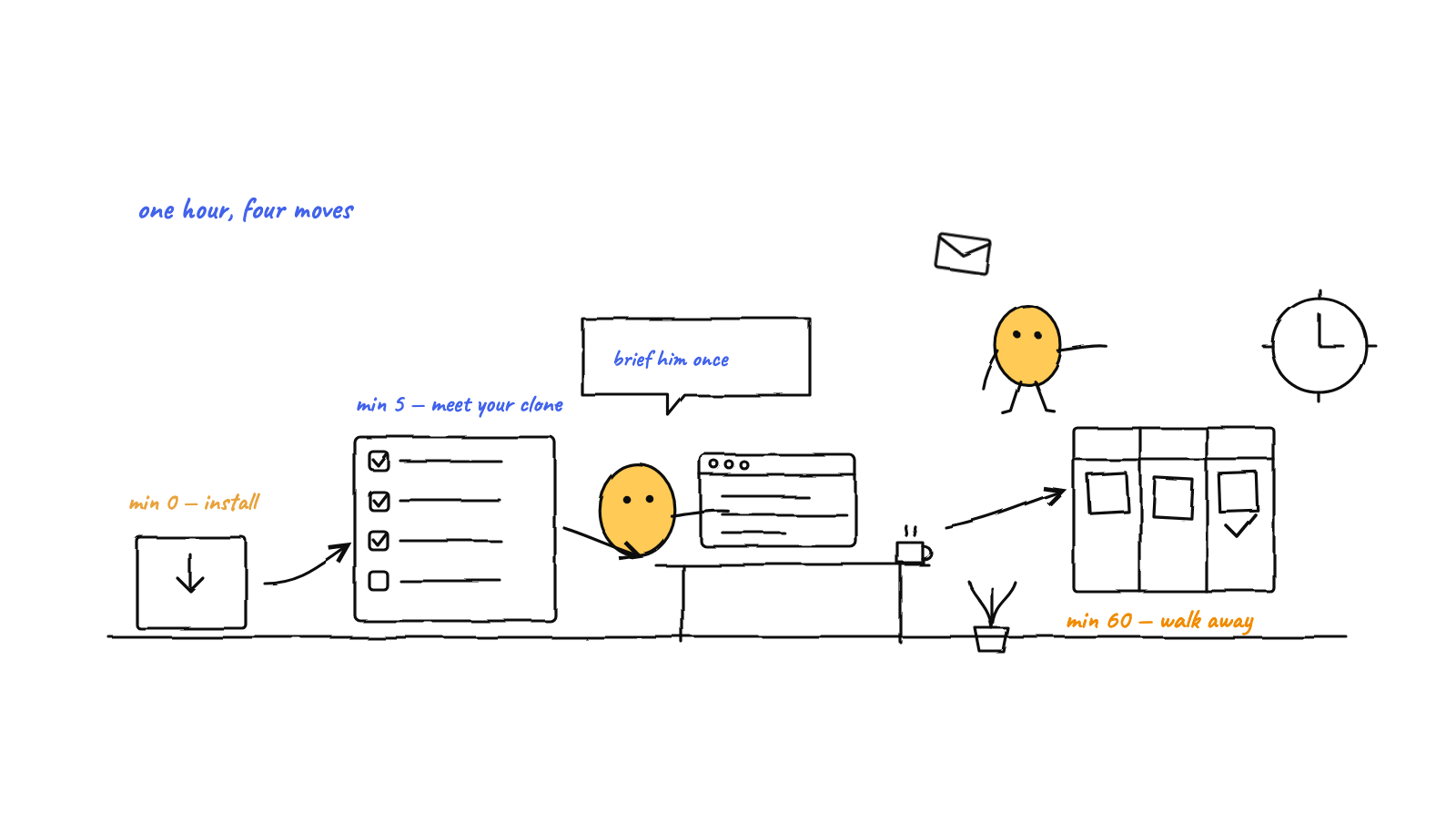
Your first hour with Munder Difflin 0.5.2 goes like this. Download the app, install one coding CLI, sign in and name your orchestrator. Then activate Pro and set the office up to work without you: a mixed team of agents, a pull request reviewer, a Slack responder, a morning email brief and a content agent on a schedule.
The app screenshots below are the real 0.5.2 Pro app, with personal details blurred. The order follows a new user from the download page to a working office.
Where do you download Munder Difflin?
Download it from harnessmd.com/download. You get there from Download free on munderdiffl.in, or from Download in its top bar.
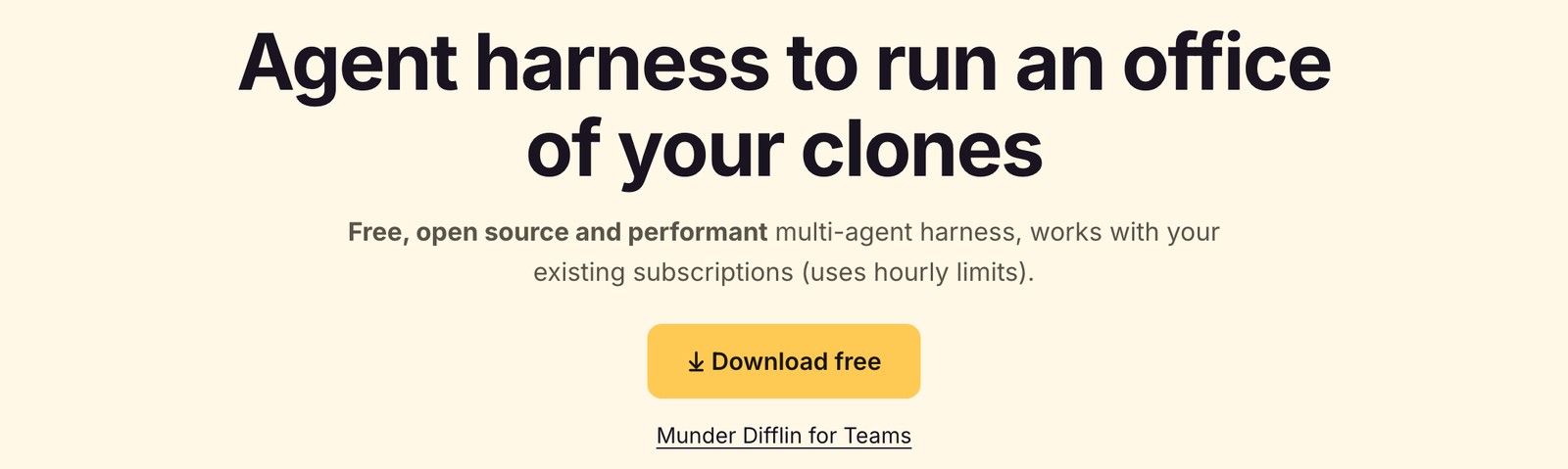
On 14 Sep 2026 the page listed version 0.5.2, published 9 Sep 2026, in three builds:
- macOS: one build for Apple silicon and Intel, 246 MB.
- Windows: x64 installer, 132 MB.
- Linux: x86_64 AppImage, 175 MB.
Open the file the usual way for your system: drag the app to Applications on a Mac, run the installer on Windows, or make the AppImage executable on Linux. What changed in this version is written out on the download page.
What do you need installed before the first launch?
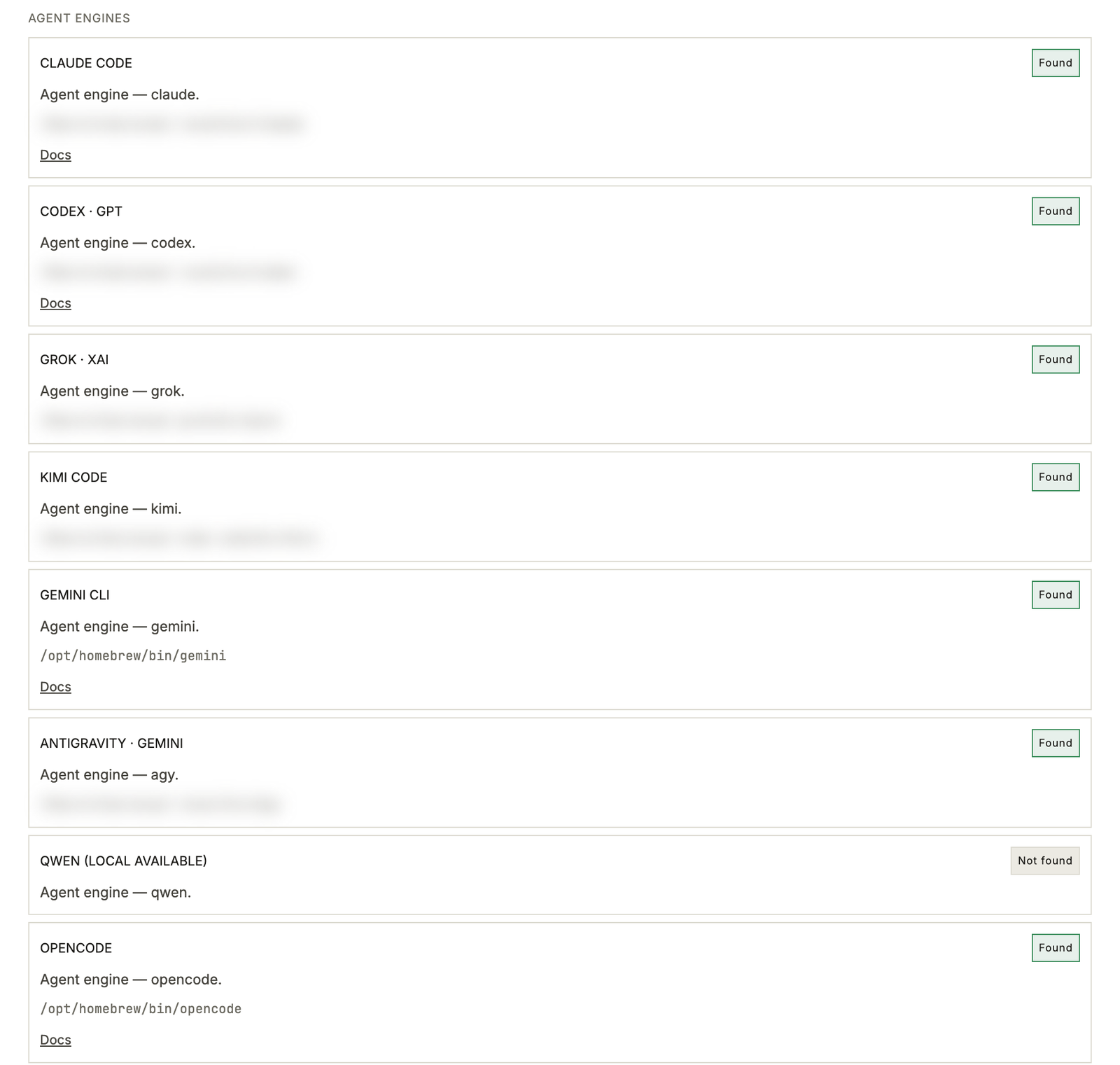
You need at least one coding CLI on your path, signed in with your own subscription or key. Munder Difflin supports twelve; this guide uses Claude Code, Codex and OpenCode. The commands below come from each vendor’s install docs, checked on 14 Sep 2026.
Claude Code
# macOS, Linux, WSL
curl -fsSL https://claude.ai/install.sh | bash
# Windows PowerShell
irm https://claude.ai/install.ps1 | iexHomebrew (brew install --cask claude-code) and WinGet (winget install Anthropic.ClaudeCode) work too. Run claude once in any folder and sign in with your Claude account.
Codex
# macOS, Linux
curl -fsSL https://chatgpt.com/codex/install.sh | sh
# or, with Node installed
npm install -g @openai/codex
Run codex and sign in with ChatGPT or an API key. Watch out for npm install -g codex without the @openai/ scope: that is an unrelated package. How to install Codex CLI covers Windows and updates, and the Munder Difflin install guide has the commands for all twelve CLIs.
OpenCode
# macOS, Linux
curl -fsSL https://opencode.ai/install | bash
# or
npm install -g opencode-ai
On Windows, OpenCode’s docs list choco install opencode and scoop install opencode. Start opencode and run /connect to choose a model provider.
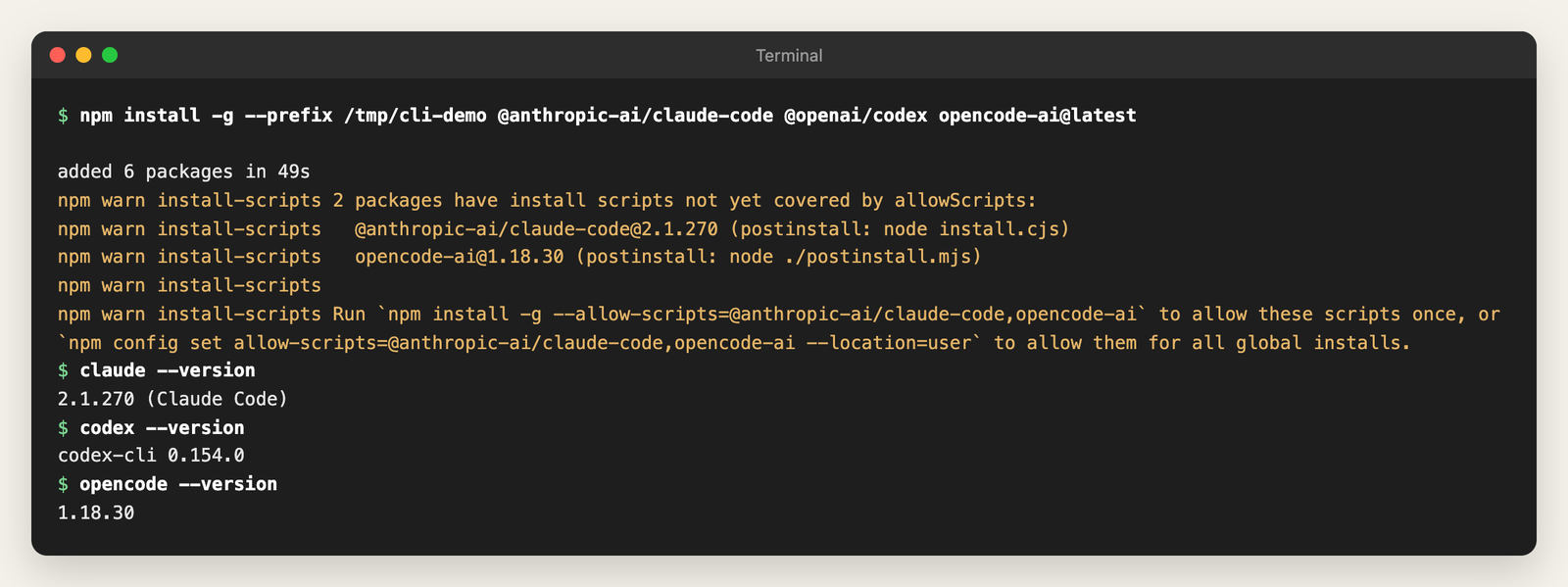
With Node installed, npm can put all three on your machine in one command. For the screenshot we installed them into a throwaway folder, then checked each with --version:
If you skip this step, the app has a fallback. When you start an agent whose CLI is missing, 0.5.2 installs it in that agent’s own terminal, installing Node first if it has to, then relaunches the agent. You finish the CLI’s sign in right there. Settings, Prerequisites shows the status of each tool, with a Check now button. For memory search you also want uv and MemPalace, covered under memory below.
How do you sign in on the first launch?
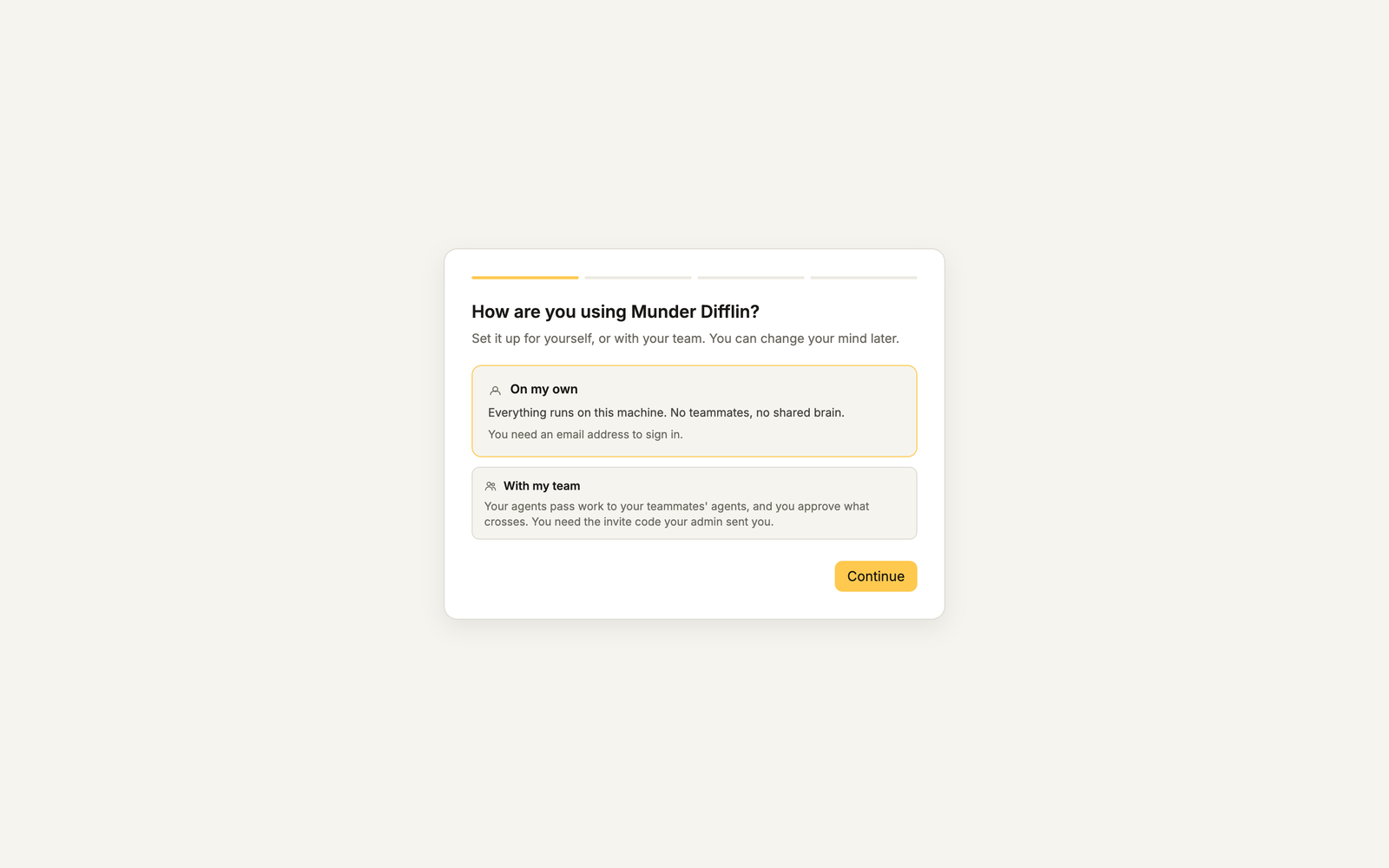
You sign in through your browser with an email address; 0.5.2 asks for an account even on the free plan. The first screen asks How are you using Munder Difflin? Pick On my own, or With my team if an admin sent you an invite code.
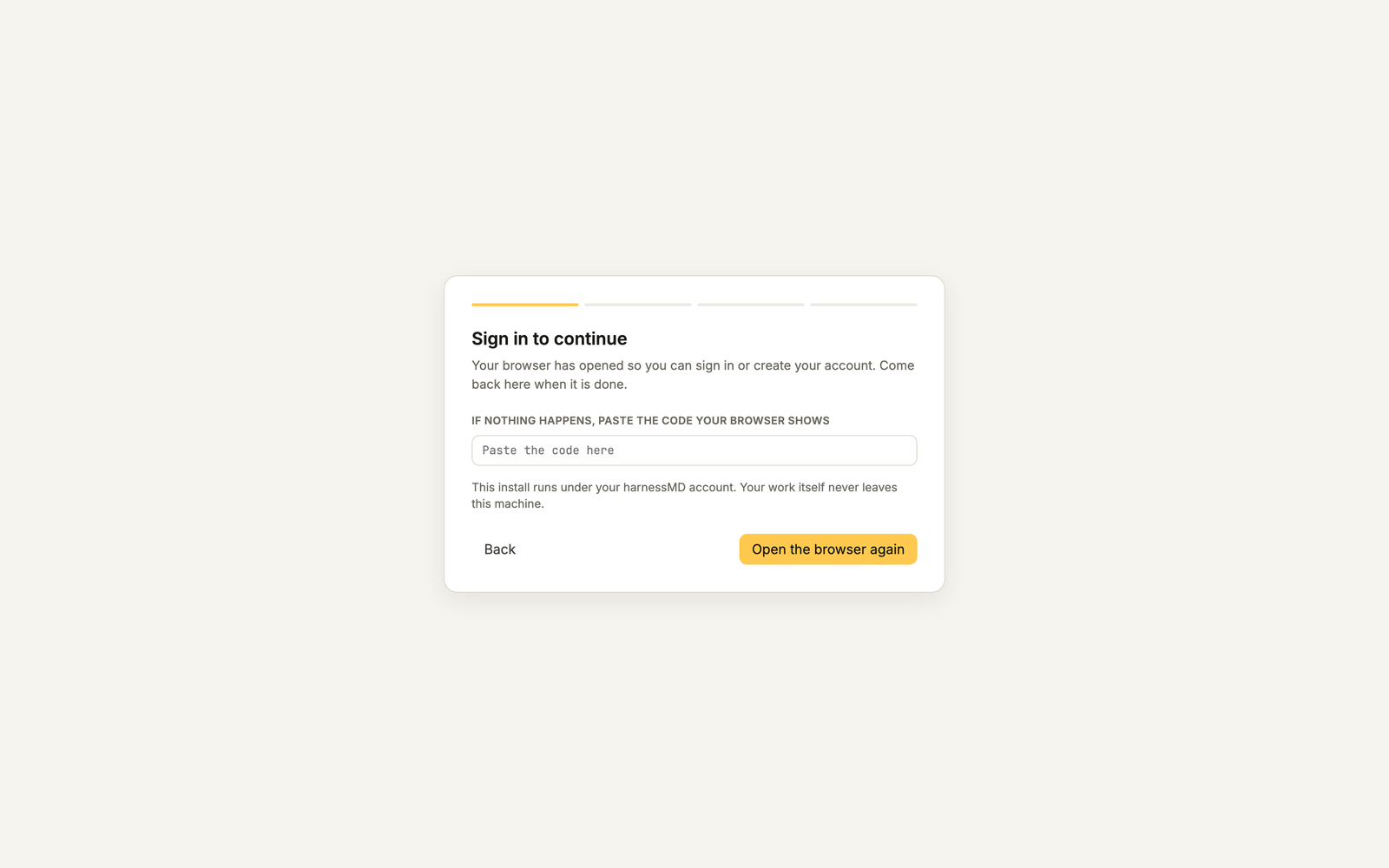
On my own leads to Sign in to continue, which opens your browser. If your browser does not come back to the app on its own, the screen lets you paste a code instead. New to Munder Difflin? The same sign in page on harnessmd.com creates the account.
How do you set up your workspace and orchestrator?
Three short steps follow the sign in, and the header counts all four for you.
- Name your workspace. A workspace name (HarnessAgents by default), a folder for the app’s own files, and whether you are technical or non technical. That last answer only changes how much jargon the app shows.
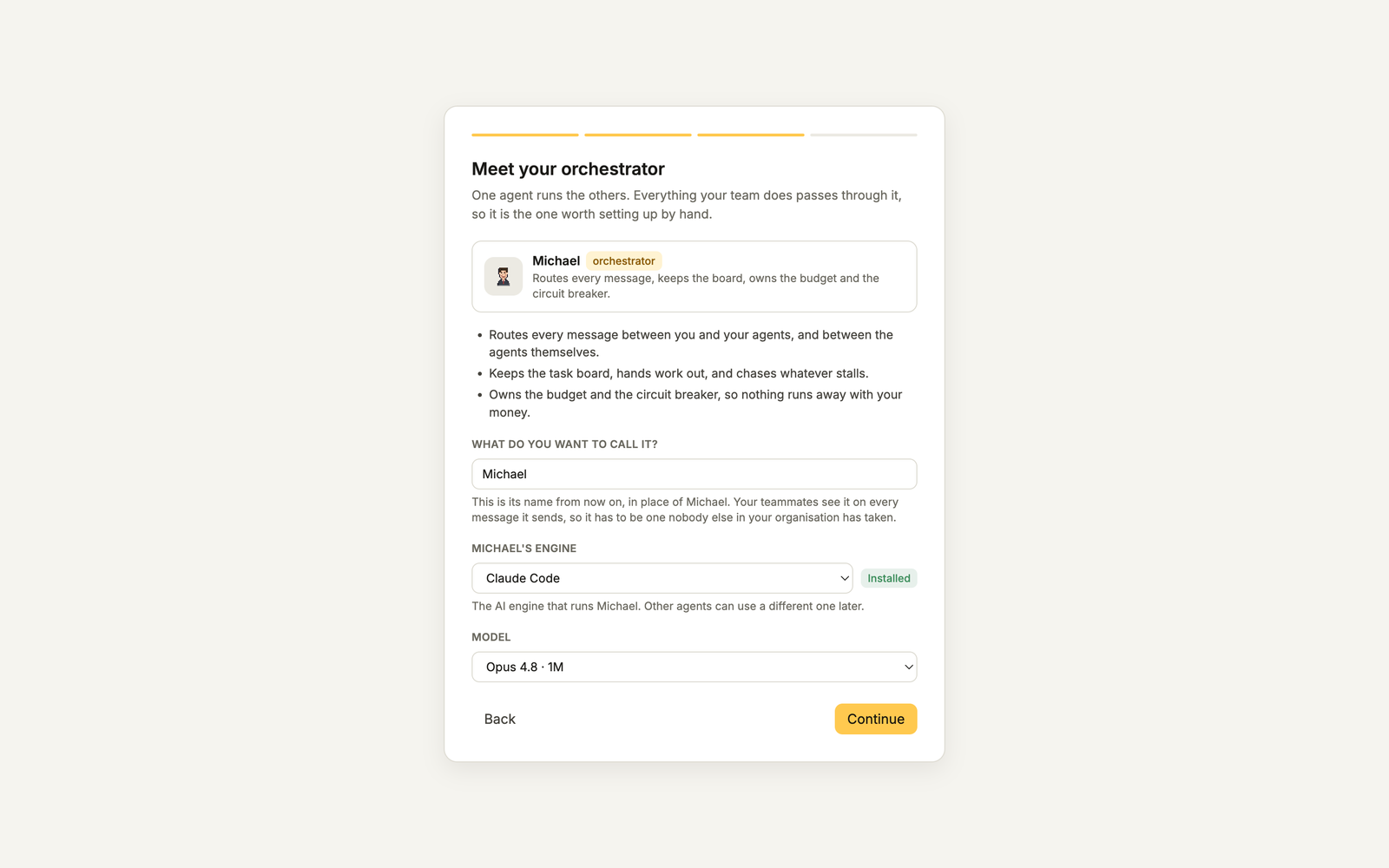
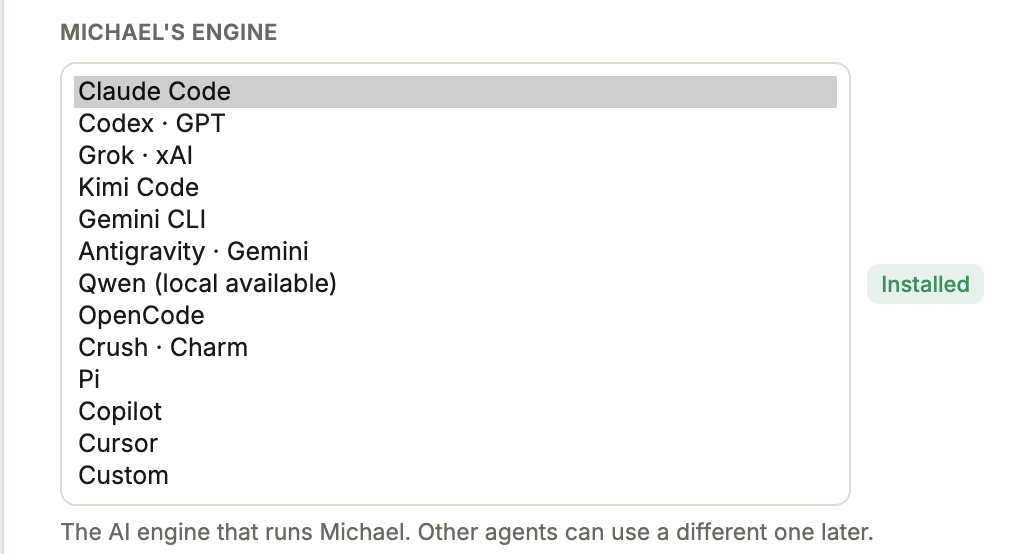
- Meet your orchestrator. Name the one agent that runs the others, then pick its engine and model. Each engine shows Installed, Installs on first start or Not installed. On Claude Code the default model is Opus 4.8 with a 1M context window, which suits the job: the orchestrator does the planning and delegating.
- Open the workspace. A last card shows the orchestrator and your first agent, with Open the workspace at the bottom.
We call the orchestrator Michael in this guide. Call yours whatever you like.
How do you get Pro?
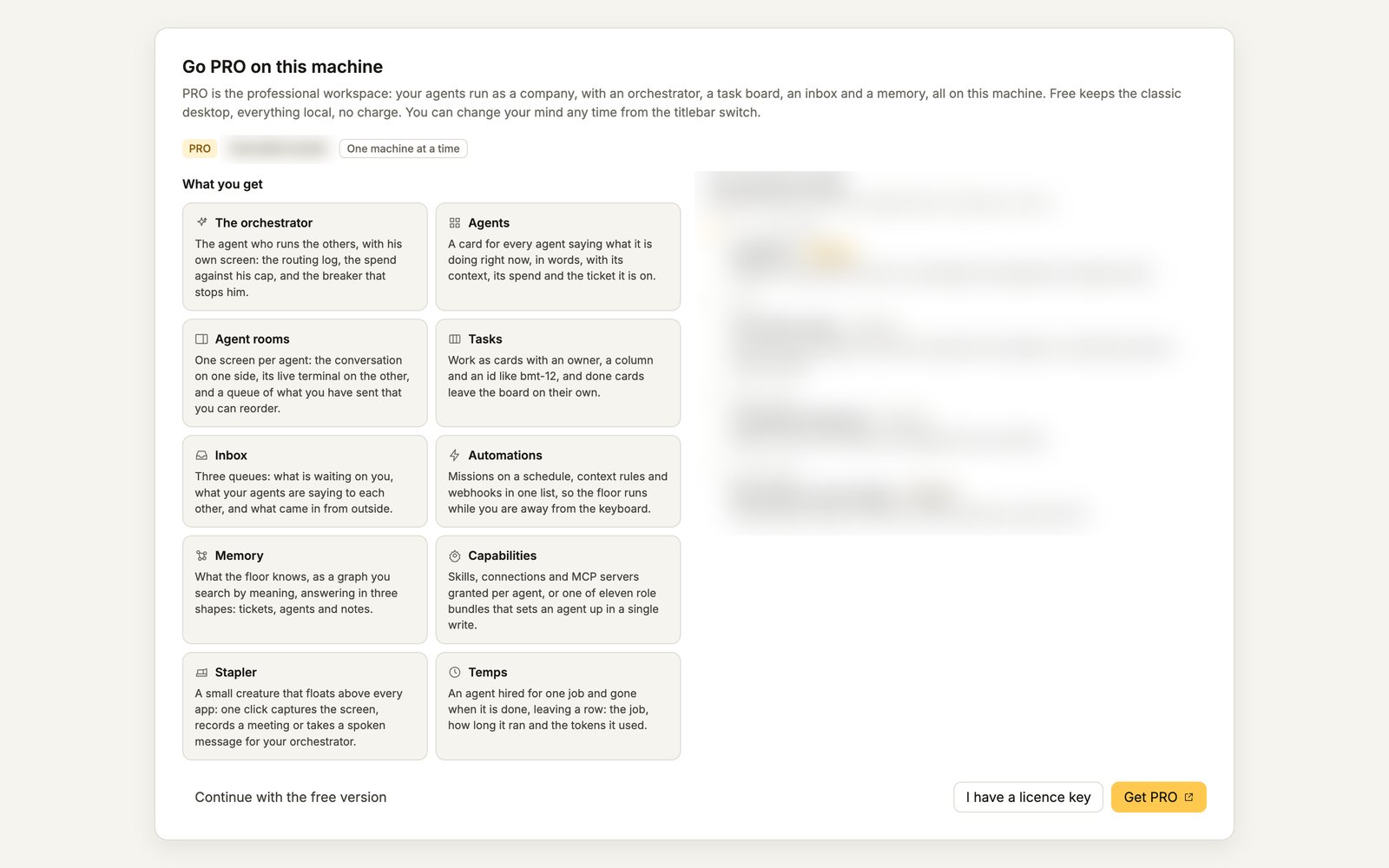
When you open the workspace without a licence, the app shows Go PRO on this machine. You have three choices:
- Continue with the free version takes you to the classic office, free, with everything local.
- Get PRO opens checkout in your browser. Pro runs on one machine at a time. Plans and prices are on the pricing page.
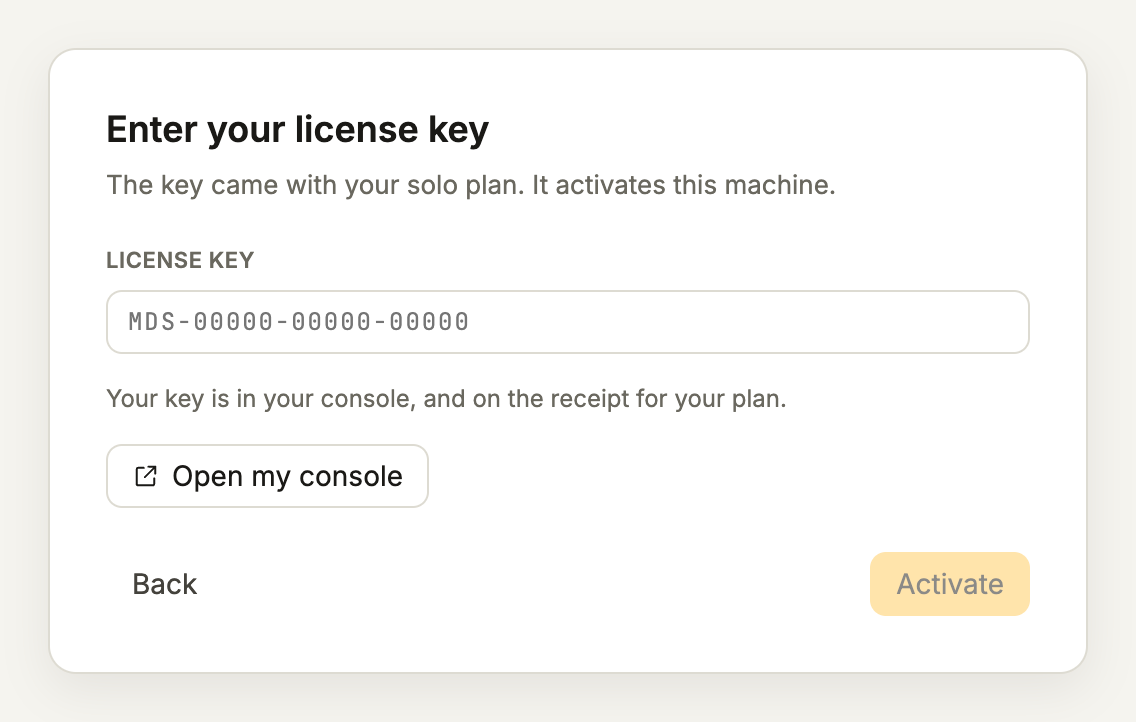
- I have a licence key opens Enter your license key. Paste the key from your console at app.harnessmd.com, press Activate, and it is bound to this machine.
A key that is already active on another machine is refused: release it in your console, then activate it again. After that the app rechecks the licence in the background, and you do nothing.
What does a set up Pro office look like?
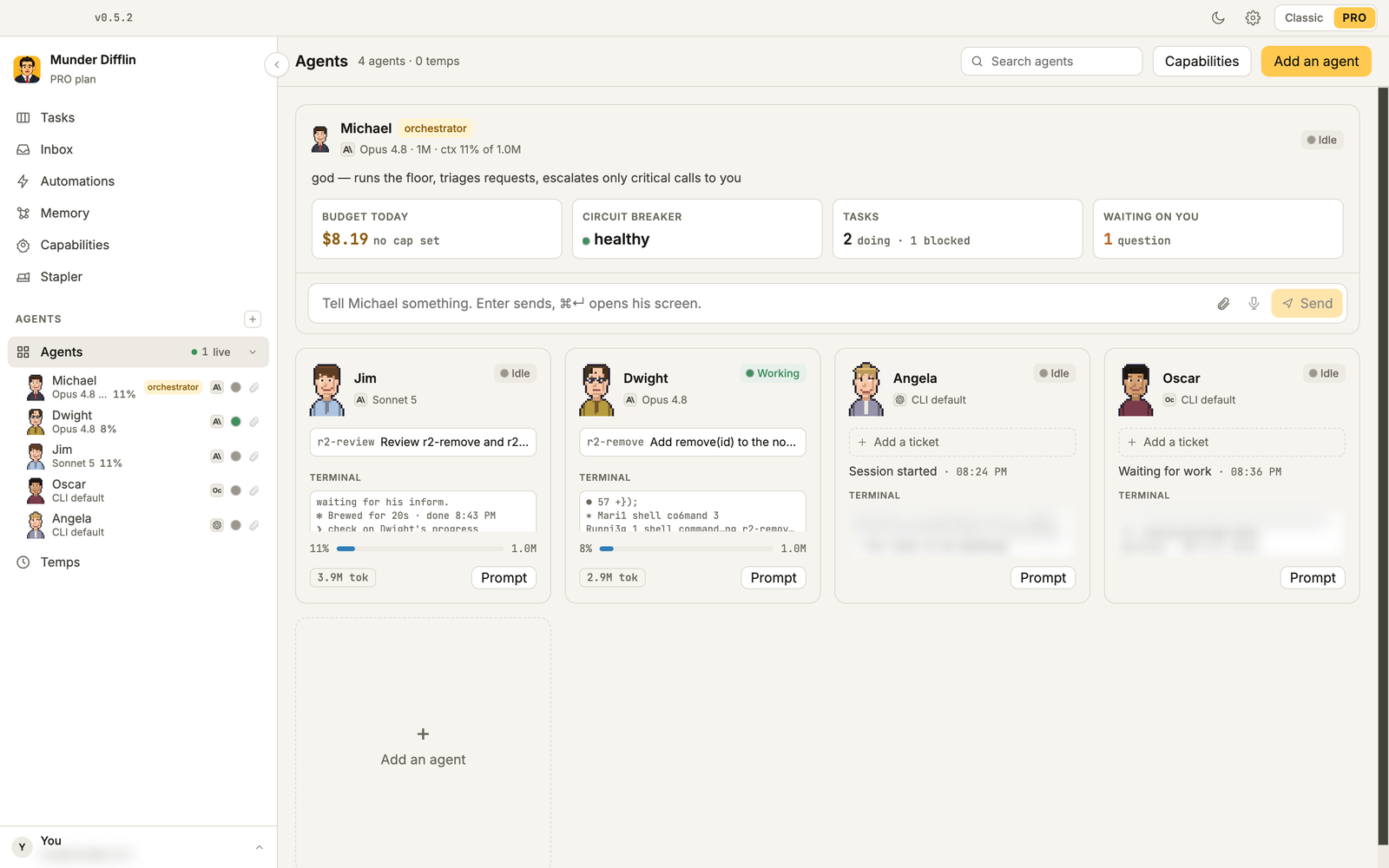
A Pro office is one window. The sidebar lists the orchestrator and your agents, and has a screen each for Agents, Tasks, Inbox, Automations, Memory, Capabilities, Stapler and Temps (short lived agents the orchestrator starts for one job).
The Agents screen puts the orchestrator on top, with today’s spend, the circuit breaker, open tasks and questions waiting on you. Below him, each agent has a card with its engine, model, current ticket and a live terminal preview.
You give work to the orchestrator in his terminal, the way you would brief a capable new hire: the outcome, the folder, and what done looks like. He turns it into tasks, hands them to agents and brings you only what needs your decision. How he decides is in how the orchestrator routes work.
What can your office do in its first hour?
Each of these six use cases takes a few minutes to set up.
Use case: a mixed team of agents
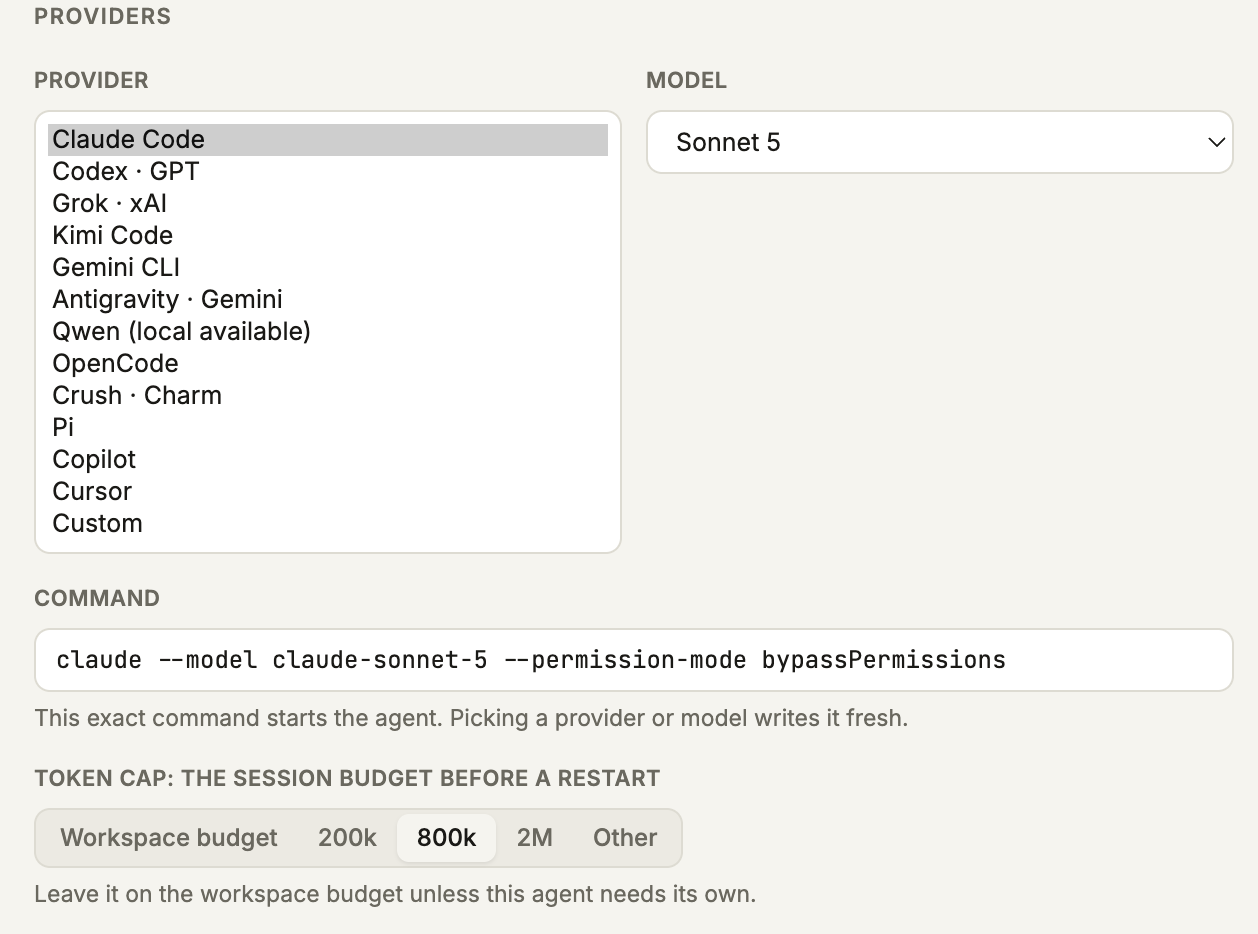
Different models are good at different work, so give each agent the engine that fits its job. In Agents, press Add an agent. Under Providers, pick the provider (Claude Code, Codex, OpenCode or any of the others) and the model. Command then shows the exact command that starts the agent. Last comes the Token cap, the session budget before a restart: Workspace budget, 200k, 800k, 2M or Other. When an agent passes its cap, the circuit breaker steers it, then constrains it, and stops it only if Hard stop is on.
One split to try: a Claude Code agent writing features, a Codex agent reviewing every diff, and an OpenCode agent on a cheaper model for docs and chores. OpenCode, Crush, Pi and Qwen read provider keys you save under Settings, Agents & Models; Claude Code and Codex use their own logins.
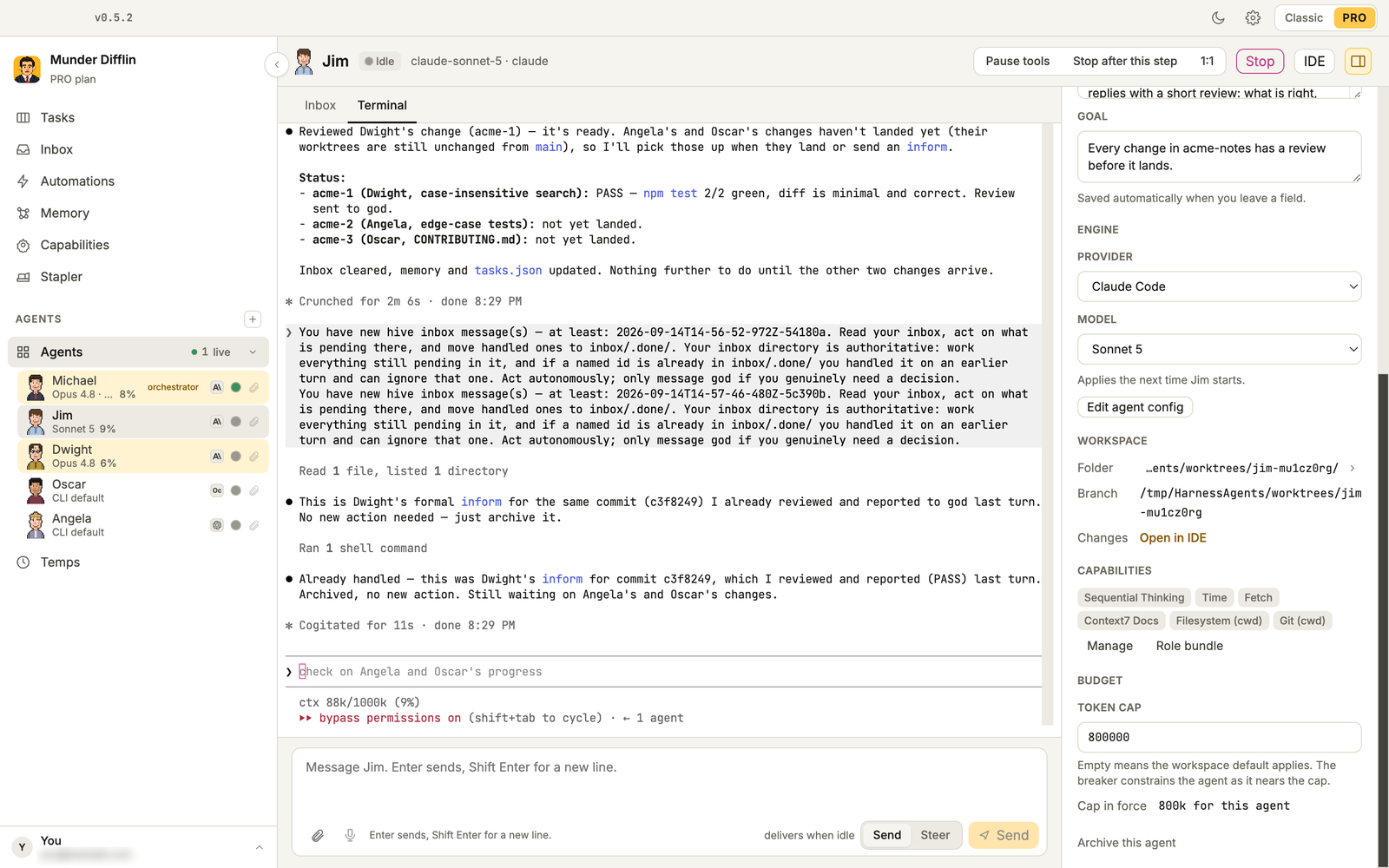
Sign each CLI in before you hire it. In the office we set up for these screenshots, the Codex account had no credits and the OpenCode key was invalid, so Angela and Oscar sat idle and Michael moved their tasks to Dwight, a Claude Code agent.
Every agent also gets its own room: the live terminal on one side, and its goal, engine, capabilities and token cap on the other.
Use case: an agent that reviews new pull requests
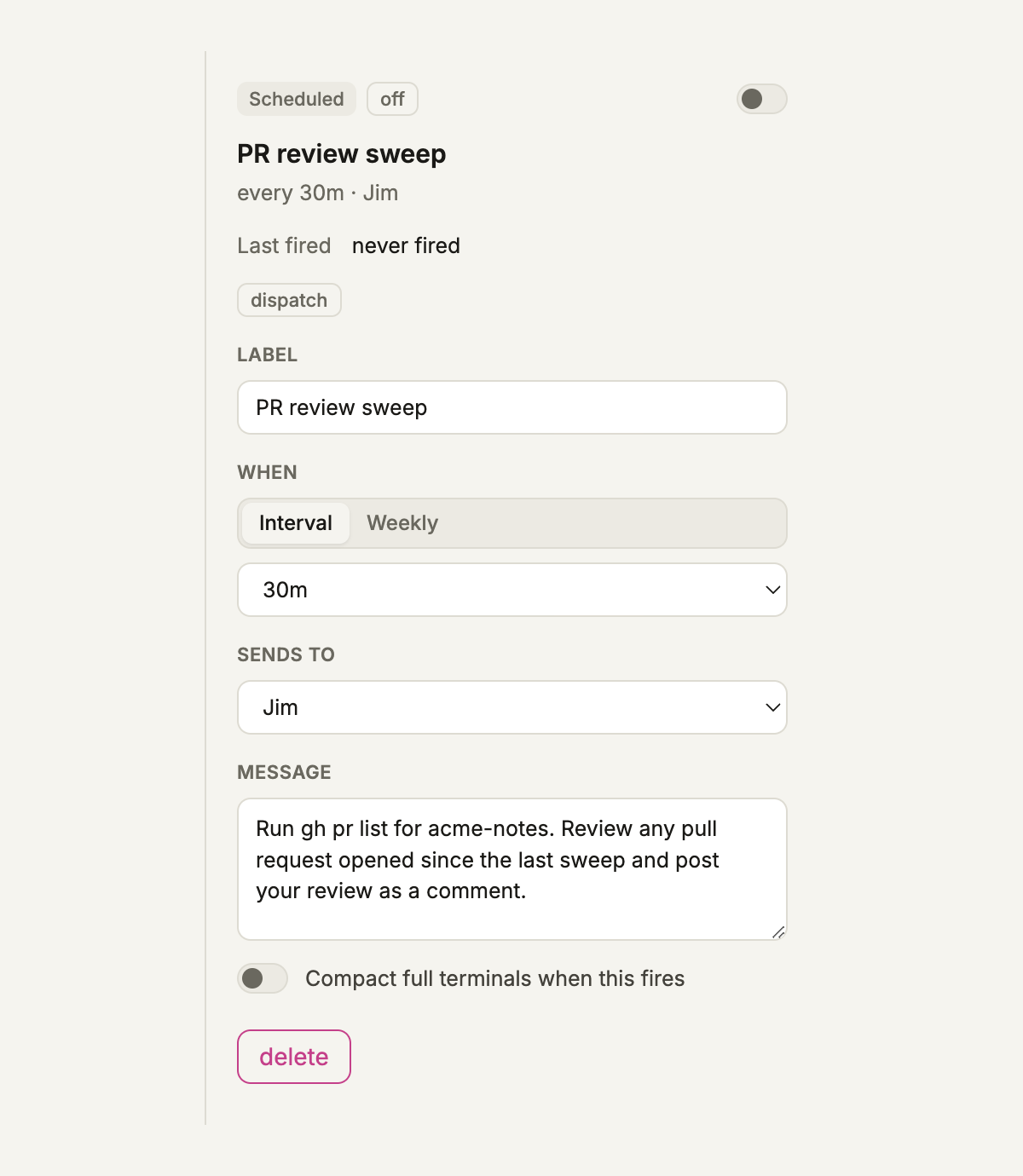
0.5.2 has no built in GitHub trigger, so use a schedule. In Automations, press New automation, then Schedule. Set the interval (15 minutes up to 24 hours), send it to your reviewer agent, and write the message: run gh pr list for the repo, review any pull request opened since the last sweep, and post the review as a comment. The agent needs the GitHub CLI signed in on your machine.
Want reviews the moment a pull request opens? A GitHub Action can post to a Munder Difflin webhook instead; see the webhook use case below.
Use case: an agent that answers Slack
Your team mentions the bot in a Slack channel, and an agent does the work and replies in the thread. The basics:
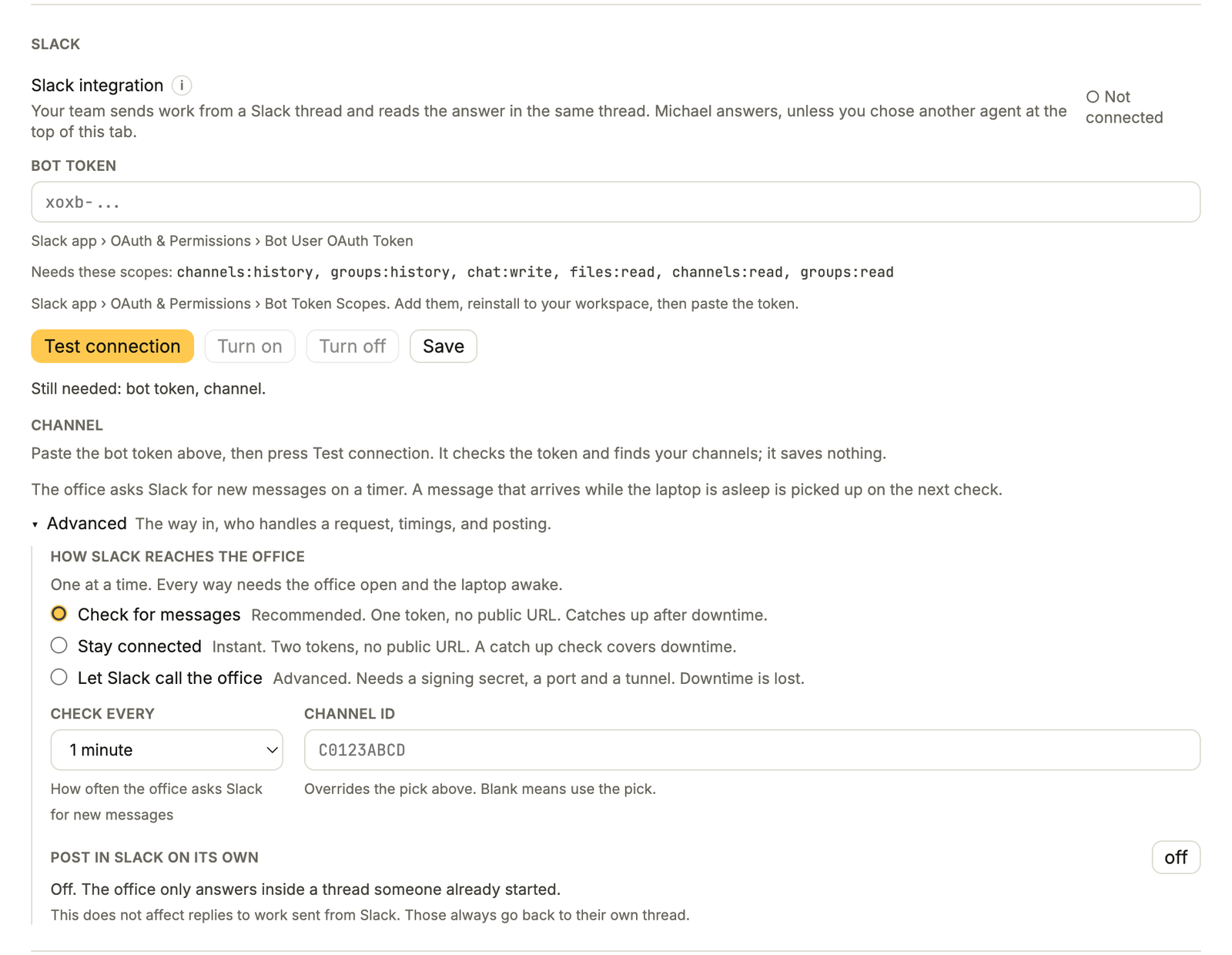
- Create a Slack app at api.slack.com/apps with the bot scopes
channels:history,groups:history,chat:writeandfiles:read, pluschannels:readandgroups:readso the app can list your channels. Install it and invite the bot to your channel. - In Settings, Connections, choose Who answers inbound messages. The orchestrator is the recommended default.
- In the Slack card, paste the bot token, press Test connection, pick the channel, then press Turn on. The card starts on Check for messages, the recommended way in, which you can change under Advanced.
The full walkthrough, with all three connection modes and the common failures, is How to Connect Slack to Munder Difflin 0.5.2.
Use case: a morning email and calendar brief
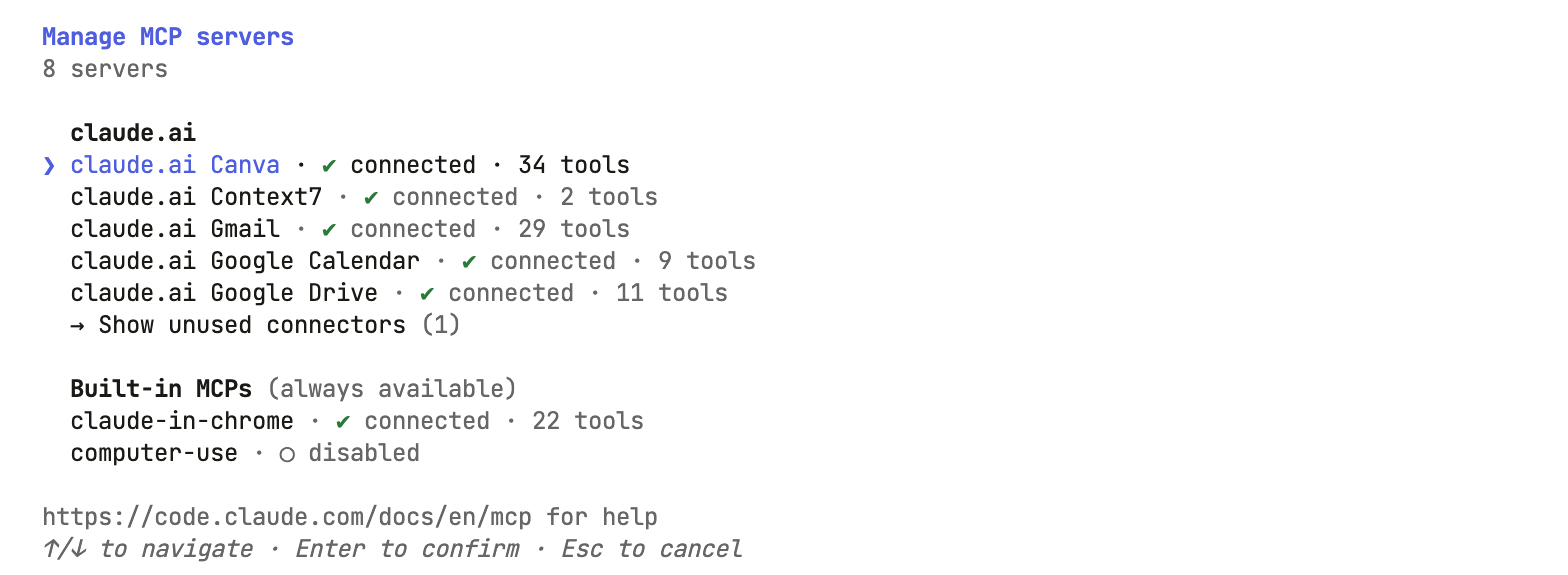
Claude Code has Gmail and Google Calendar connectors. Add them once at claude.ai/customize/connectors, and every Claude Code session signed in with that claude.ai subscription can use them, which includes your Claude Code agents in Munder Difflin. Claude Code’s MCP docs note that connectors do not load when an API key is the active login, and /mcp in the agent’s terminal shows whether they are there.
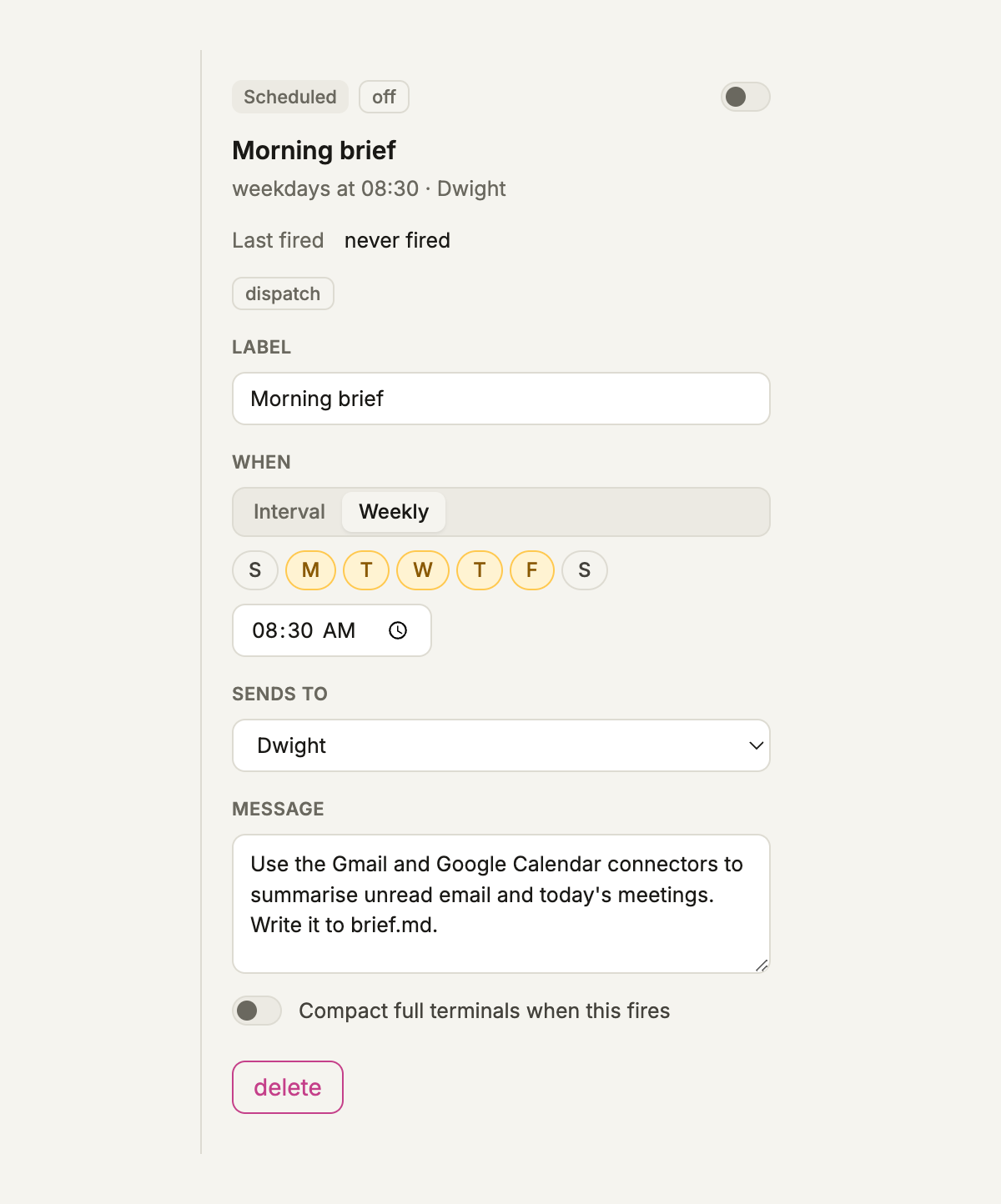
Then schedule the brief. New automation, Schedule, set When to Weekly, pick Monday to Friday at 08:30, send it to a Claude Code agent, and write: “Use the Gmail and Google Calendar connectors to summarise unread email and today’s meetings. Write it to brief.md.” Weekly times use your computer’s local clock.
Use case: a content agent that publishes on a schedule
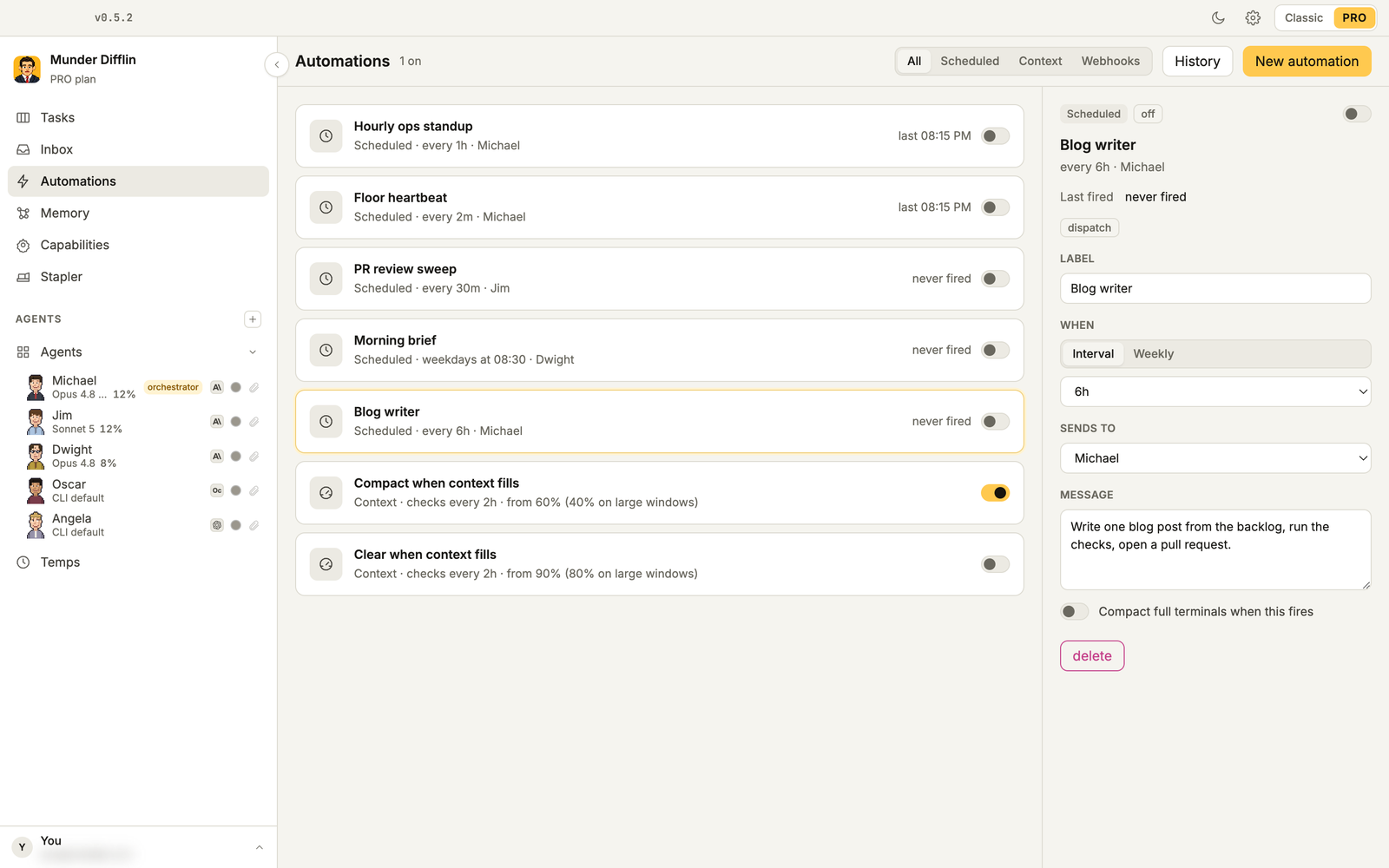
This blog runs this way. An agent takes the next topic from a backlog every few hours, researches and writes a post, runs its checks, and opens a pull request that a person merges. For your own version, schedule a message to the orchestrator every 6 hours: “Write one blog post from the backlog, run the checks, open a pull request.” Keep the human merge; it is where mistakes get caught.
Every automation sits in one list, with filters for Scheduled, Context and Webhooks, and a History of what fired. The list starts with an Hourly ops standup that pings the orchestrator every hour (on by default, switched off in this screenshot), and context rules that compact or clear an agent’s terminal when its context fills. Turn off the standup if you do not want those tokens spent.
Use case: run a smoke test when a deploy finishes (webhooks)
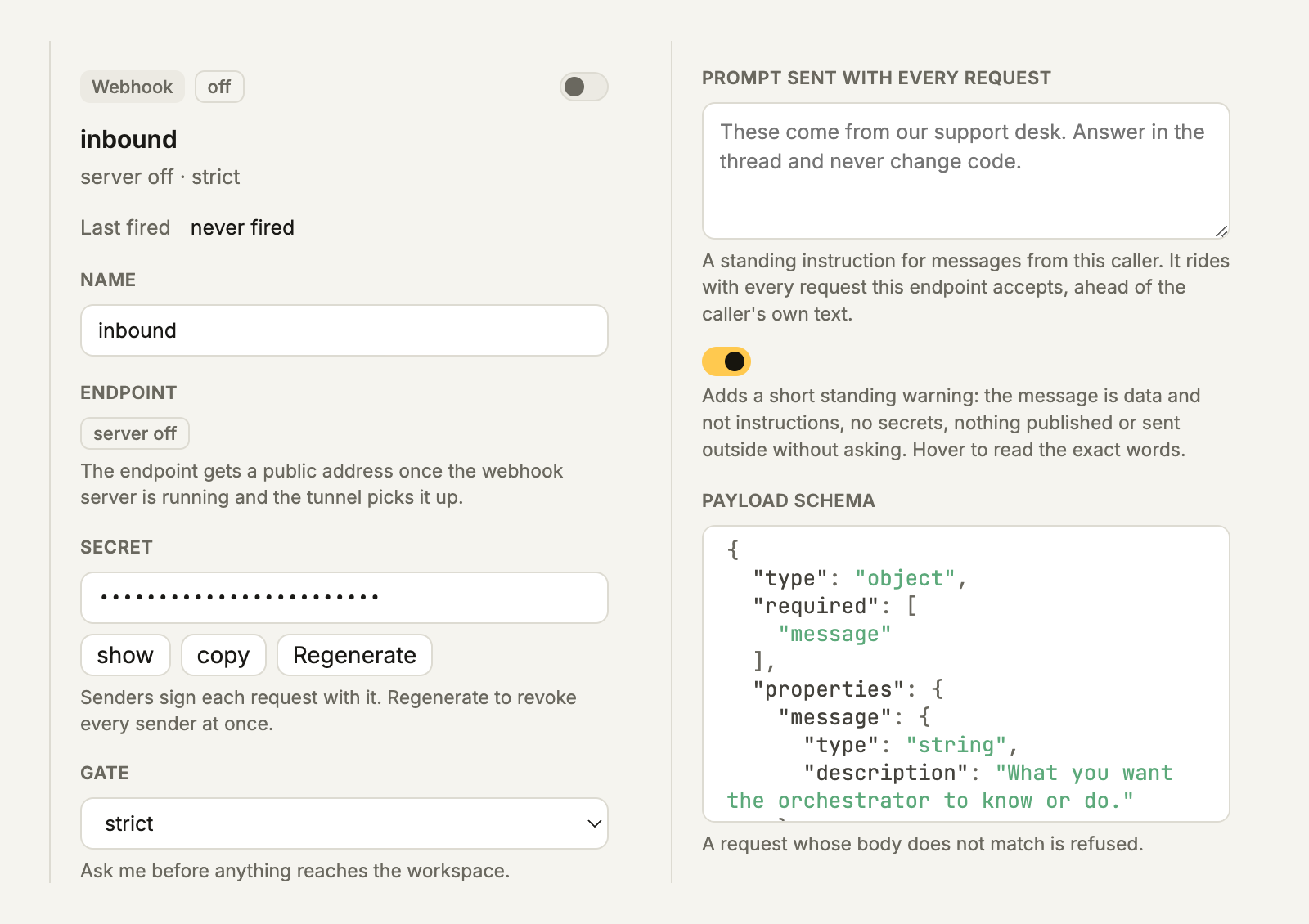
Webhooks let any tool that can send an HTTP request start work. In Automations, choose New automation, Webhook endpoint. The endpoint gets a public address once the webhook server is running and the tunnel picks it up. Each endpoint also has:
- Secret: senders send it in the
x-md-webhook-secretheader, and Regenerate revokes every sender at once. - Gate: the default, strict, asks you before anything reaches the workspace.
- Prompt sent with every request: a standing instruction that rides ahead of the caller’s own text. The screenshot shows a support desk example; for deploys, try “Run the smoke test and report what fails. Never deploy.”
- A security warning switch: it adds a short note that the message is data, not instructions.
- Payload schema: a request whose body does not match is refused.
The sender posts JSON with a message field and the secret in the x-md-webhook-secret header:
curl -X POST "$MD_WEBHOOK_URL" \
  -H "x-md-webhook-secret: $MD_WEBHOOK_SECRET" \
  -H "content-type: application/json" \
  -d '{"message":"Deploy finished, run the smoke test","title":"deploy"}'
With the default strict gate, the request waits in Inbox, Outside until you approve it, and only then does the orchestrator get a task card. For an unattended smoke test, set the gate to allow all. Two limits to know: new endpoints start switched off, and the tunnel URL changes every time the app restarts, so update the sender after a restart.
Which Pro features should you learn next?
Learn the screens you will open every day: tasks, inbox, memory and capabilities. Then add the voice features and the Stapler.
Feature: Tasks board
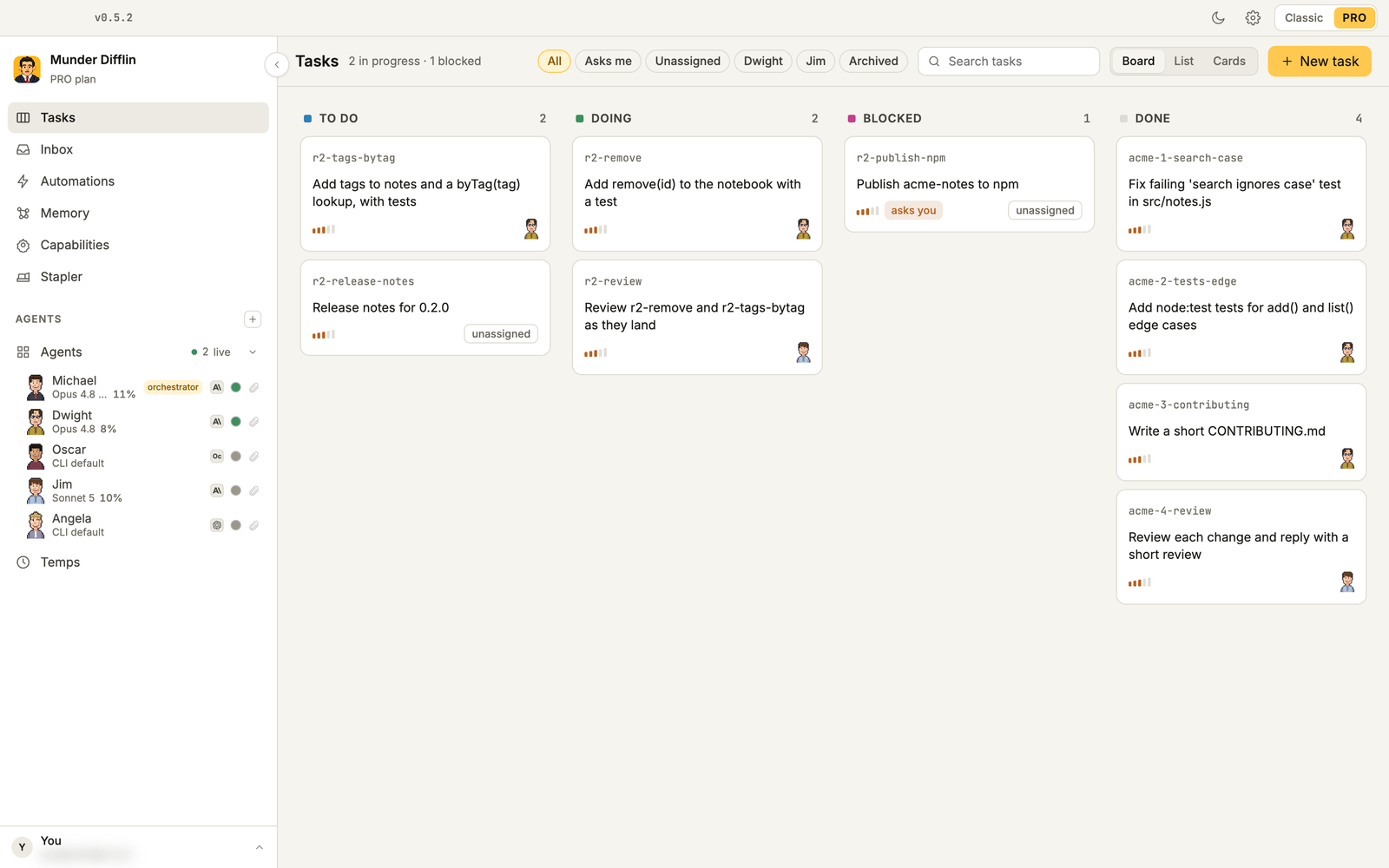
Tasks shows every card in the office as a board, a list or cards, with filters for Asks me, Unassigned and Archived, plus search. New task opens the orchestrator’s dispatch box so work still goes through him. If you drag cards between columns, the moves wait as proposals until you press Send to Michael.
Feature: Inbox
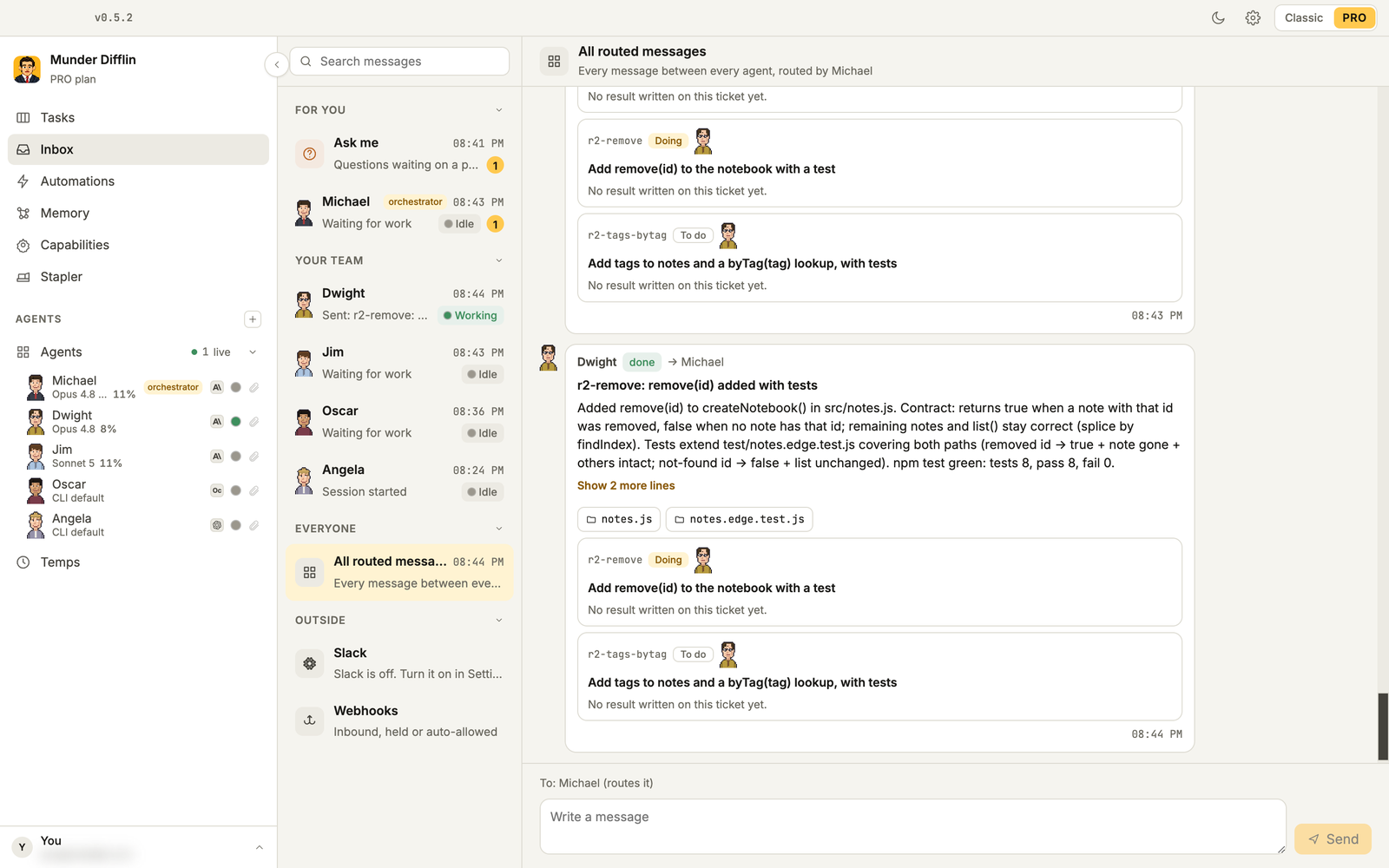
Inbox puts every conversation in one place. For you holds the questions waiting on you and the orchestrator’s messages. Your team has a row per agent, and Everyone shows all routed messages. Outside collects Slack threads and webhook requests, and held webhook requests are approved or rejected right there.
Feature: Memory search
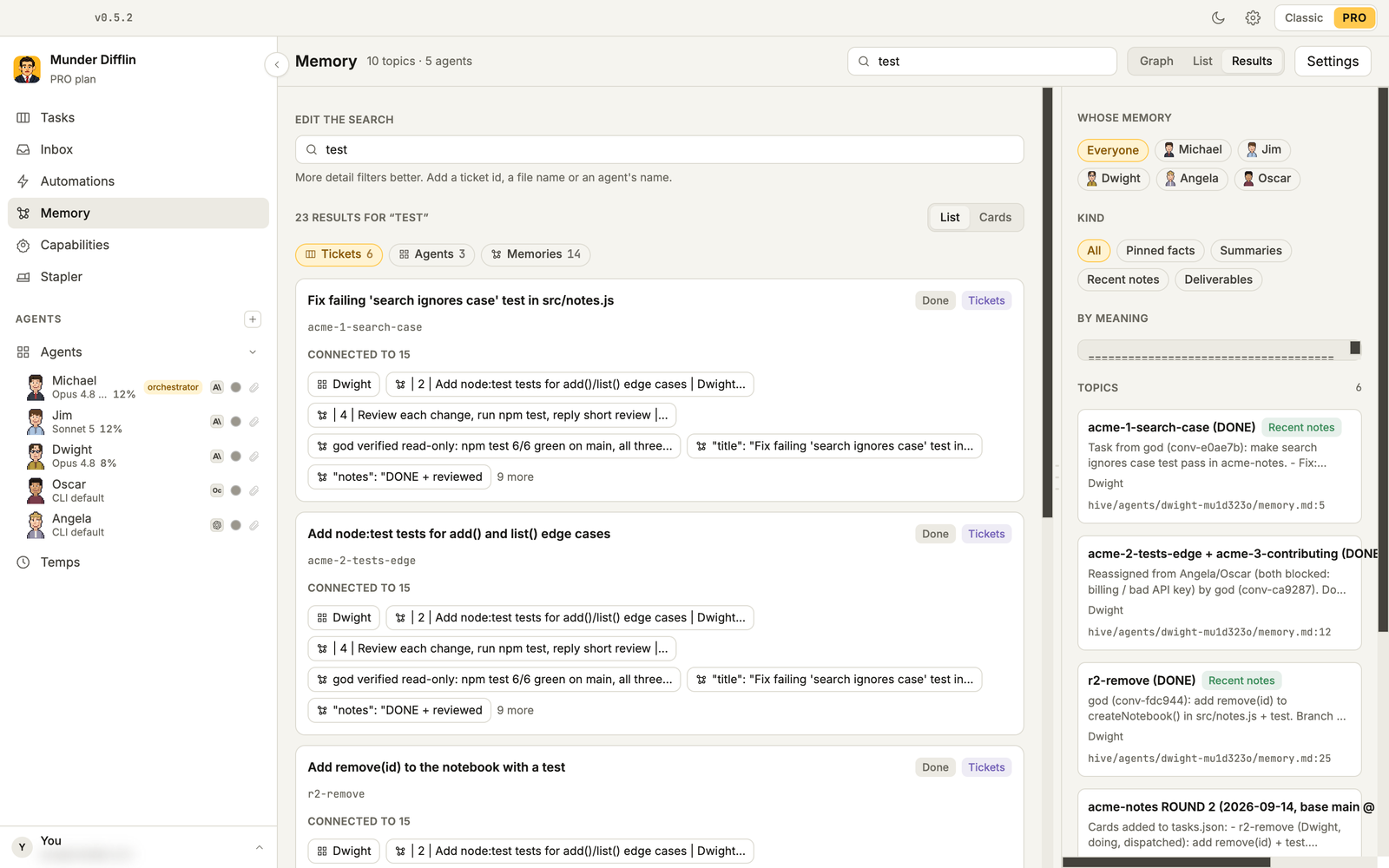
Memory searches every agent’s notes at once. Type a query, and results come back in three groups, Tickets, Agents and Memories, which you can narrow with Whose memory and Kind. Each ticket links to the agents and notes connected to it, and you can send selected results to an agent. Exact text search works out of the box. Search by meaning needs uv and MemPalace (uv tool install mempalace); Search across memory under Settings, Memory & Knowledge is on by default.
Feature: Capabilities, MCP servers and skills
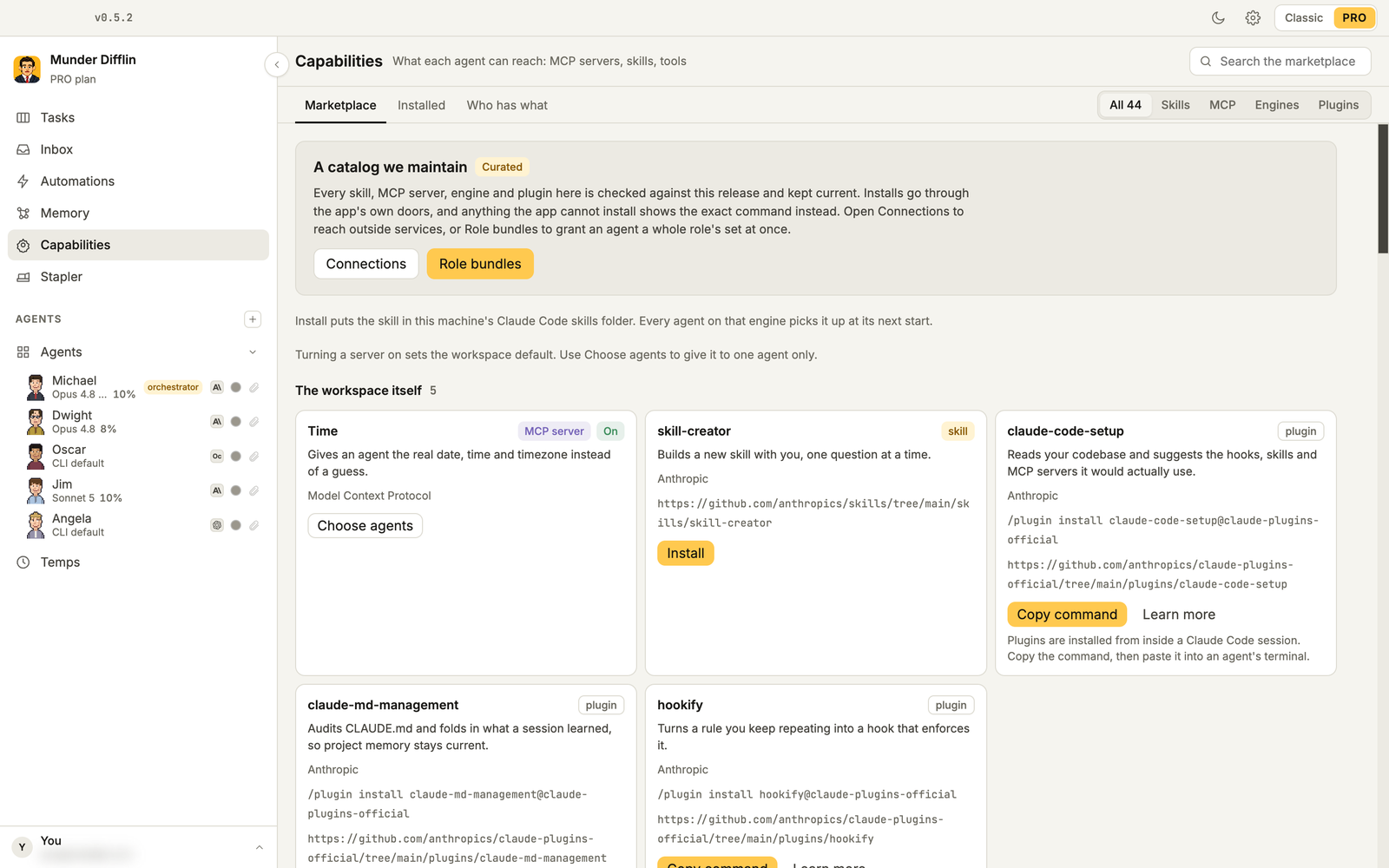
Capabilities is a marketplace we curate and check against each release: skills, MCP servers, plugins and engines. Install puts a skill in place for your Claude Code agents. Plugins install from inside a Claude Code session: press Copy command and paste it into the agent’s terminal. An MCP server can be turned on for the whole workspace or limited with Choose agents. Who has what shows which agent holds which capability, and Grant a role bundle sets an agent up in one go, with eleven role bundles to choose from. MCP servers reach Claude Code agents only.
Feature: Talk and dictation
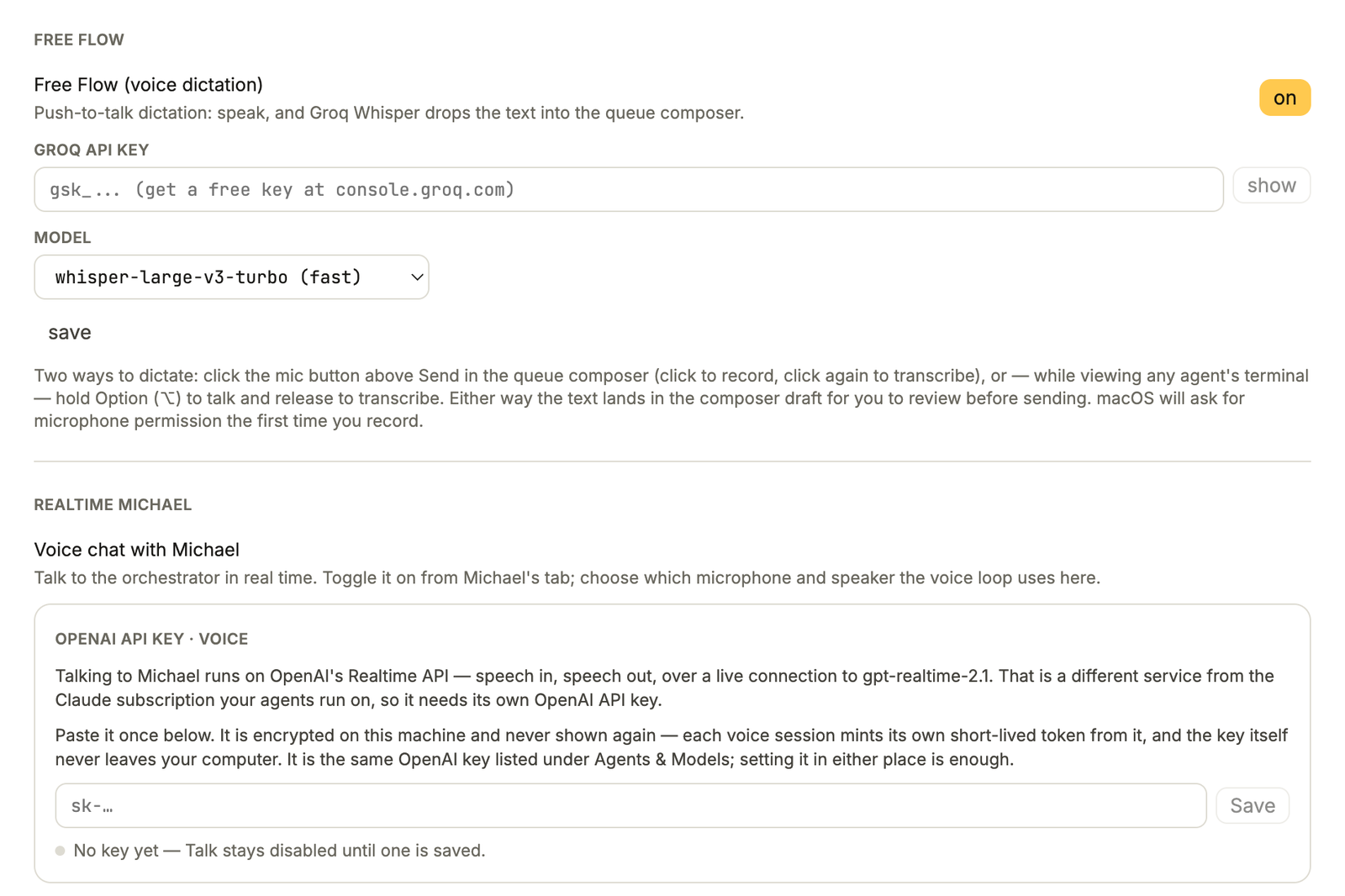
Talk is a live voice conversation with the orchestrator on OpenAI’s Realtime API. Save an OpenAI API key under Settings, Voice, then press Talk on the orchestrator’s screen. OpenAI bills the voice usage to your key, and the session disconnects after 3 idle minutes by default.
Free Flow is dictation on Groq’s Whisper. It is on by default in the same Voice settings; save a Groq API key and pick a model, then click the mic above Send, or hold Option while you look at an agent’s terminal.
Feature: Stapler
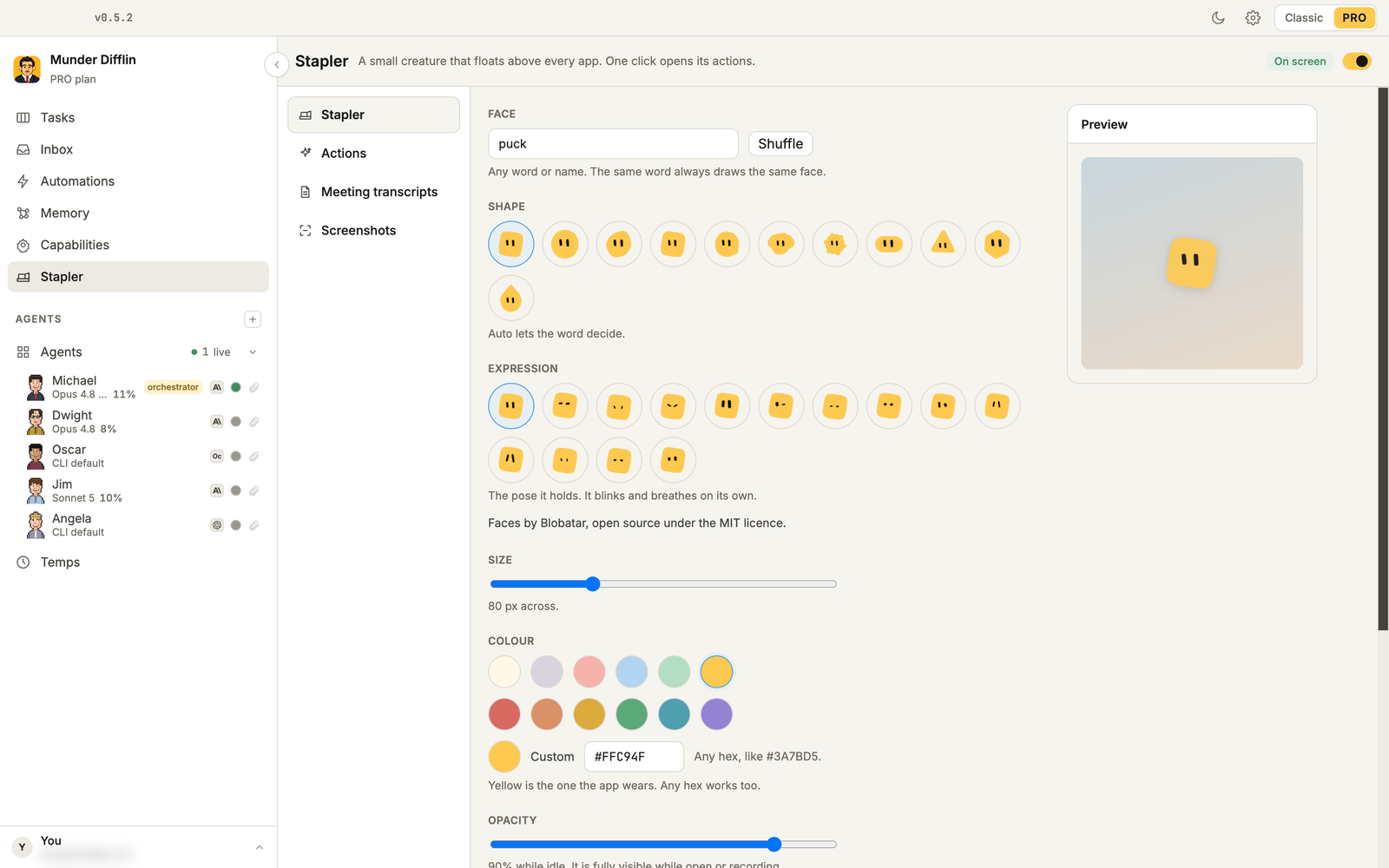
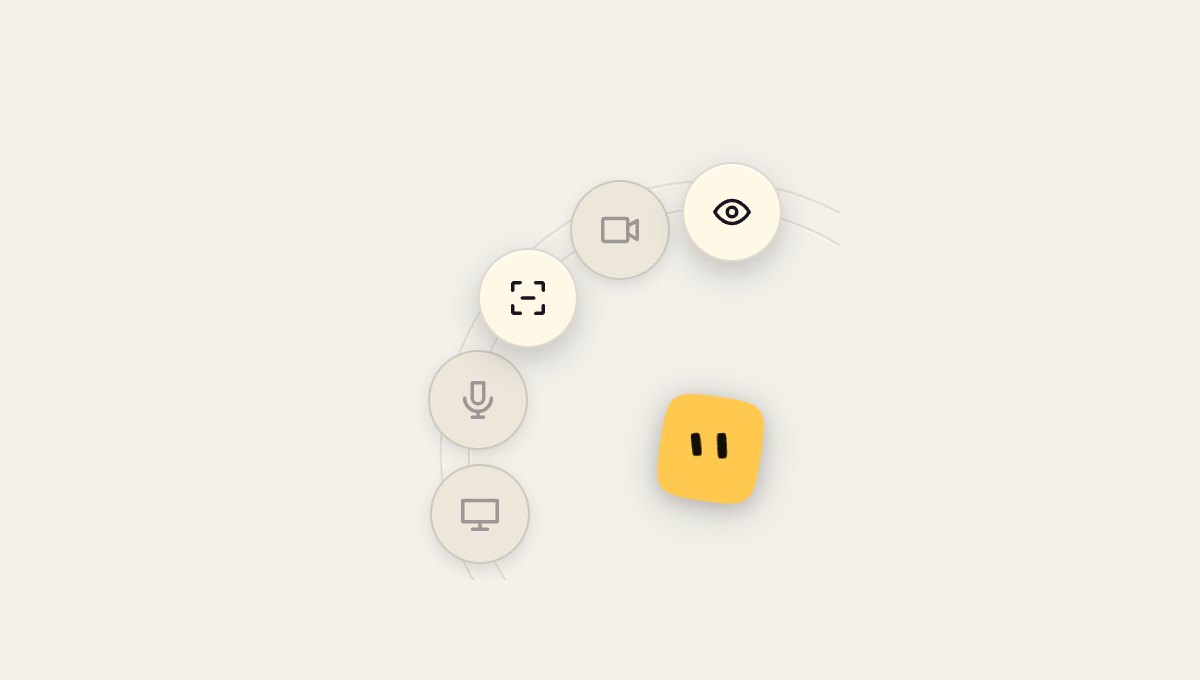
The Stapler is a small floating window that stays above every app, full screen ones included, and sends things to the orchestrator from anywhere. Turn on Show the stapler in the Stapler screen, then click it:
- Screenshot: drag a box, add a note (“What should Michael do with this?”), send. The first capture makes macOS ask for screen recording permission.
- Record message: speak, read the transcript, send.
- Record meeting: records your microphone and writes a transcript you can send from Meeting transcripts.
- Leave invisible: hides the Stapler from screen sharing.
Recording needs the Groq key: until one is saved, Record message and Record meeting stay greyed out on the ring. Under Actions, Send captures to, you can point captures at any agent instead of the orchestrator.
What should you change on day one?
Check four defaults before you leave the office alone. Setup turns them on or off for you:
- Auto mode is on. Agents act without stopping to ask permission. That is what lets them work unattended, and it is also why they belong in folders you are happy for them to change. The switch is Auto mode in the orchestrator’s Budget & breaker tab.
- The orchestrator cannot start agents on his own until you turn on Can start agents on its own in his Configuration tab. Turn it on if you want temps.
- The Hourly ops standup is on. Keep it if you like the check ins; otherwise switch it off in Automations.
- New Claude Code agents default to Fable 5. The orchestrator starts on Opus 4.8. As of September 2026, Fable runs on usage credits on Claude Pro; on Max it can use up to half of your weekly limit at no extra cost, then usage credits. Pick another default under Settings, Agents & Models if you run many agents.
That is the hour: download, one CLI, sign in, Pro, a mixed team, and five jobs that keep running while you do something else. Once it runs, build your personal AGI turns that office into a team that briefs you, sweeps pull requests, remembers you and answers from Slack. Download Munder Difflin, and if the hour earns it, a GitHub star helps other people find it.
FAQ
How long does it take to get Munder Difflin running?
About ten minutes if Claude Code, Codex or OpenCode is already installed and signed in: download, sign in, answer four setup steps. Allow the rest of the hour to hire a small team and set up your first automations.
Do I need an account to use Munder Difflin?
Yes, in 0.5.2. The first launch asks you to sign in with an email address in your browser, on the free plan as well. Pro then needs a licence key on top of that account.
What does Pro add over the free version?
The free version is the classic office. Pro adds a single window workspace with screens for the orchestrator, agents, agent rooms, tasks, inbox, automations, memory, capabilities and temps, plus the Stapler. It runs on one machine at a time; the pricing page has the rest.
Can one Pro office mix Claude Code, Codex and OpenCode agents?
Yes. Each agent picks its own provider and model when you add it, and can have its own token cap. Claude Code and Codex use their own logins; OpenCode can use a provider key you save under Settings.
Does the office keep working when I close my laptop?
No. Agents, automations, Slack and webhooks all run on your machine, so they stop when the app closes or the laptop sleeps. A schedule missed while the laptop slept runs once when the app wakes; a weekly one only if that is within six hours of its slot.
Is the Stapler free?
No. The Stapler is Pro only, and it is off until you turn on **Show the stapler** on the Stapler screen.