GTA 6 Content Creator Kit: Clips, Thumbnails, Titles and a Posting Plan From an AI Agent Team
A GTA 6 content creator kit: PS5 and Xbox capture settings, YouTube thumbnail and banner sizes, spoiler free titles and an agent team's posting plan.
A GTA 6 content creator kit is five things: console capture settings, Rockstar’s reported footage rules, YouTube’s image sizes, spoiler free titles and a posting plan an agent team prepares while you play. Checked 19 Nov 2026.
Rockstar’s Newswire says “Grand Theft Auto VI arrives November 19 to PlayStation 5 and XBOX Series X|S.” You can do every step by hand, or use Munder Difflin, free and open source: a desktop app that runs a team of AI agents for all kinds of knowledge work, coding included, on your own computer. For what to make, read GTA 6 YouTube channel ideas; for paid campaigns, the clipping farm guide; for everything else, the GTA 6 money hub.
How do you capture GTA 6 clips on PS5?
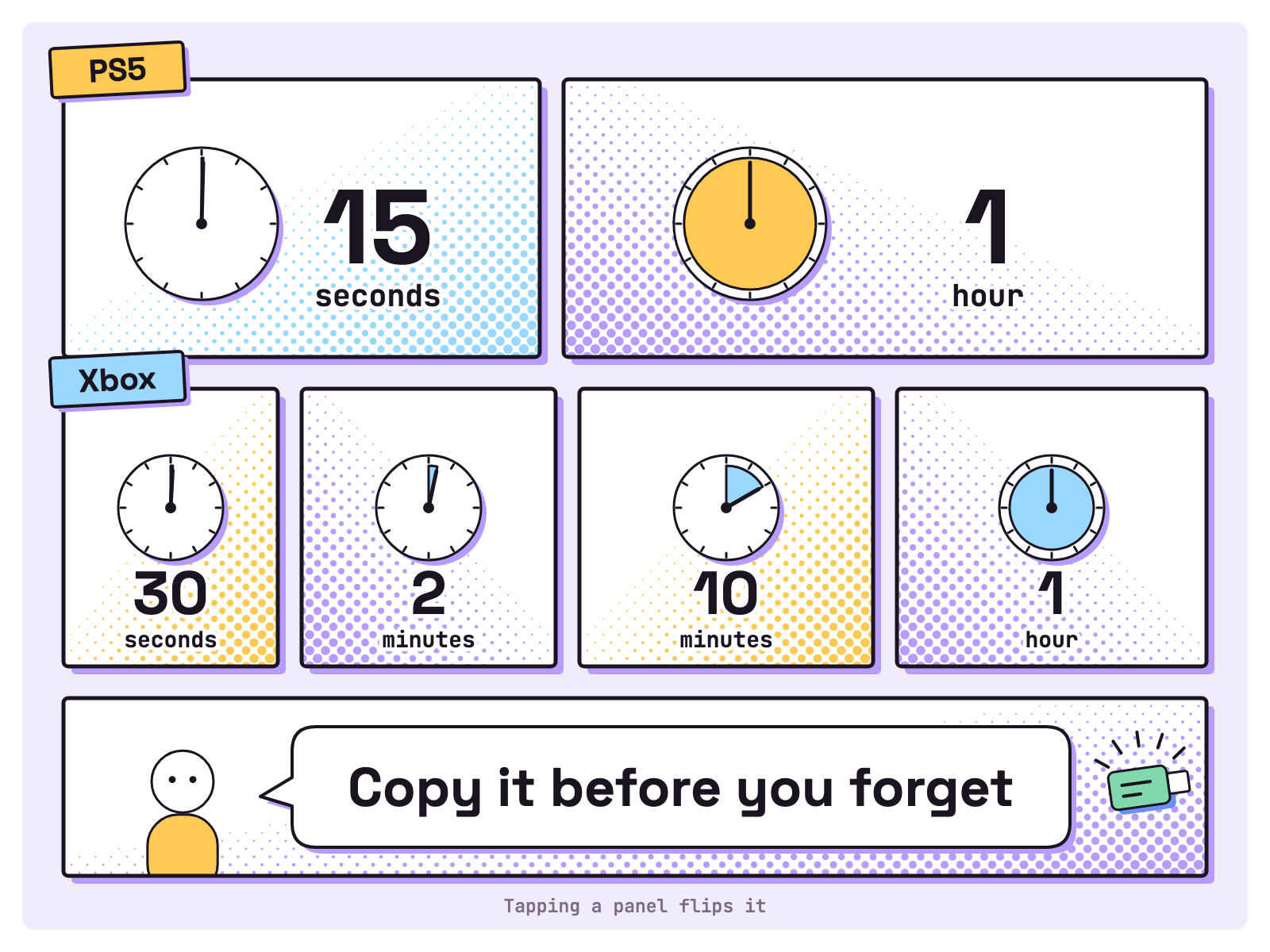
Press the create button. Sony’s capture page, read 19 Nov 2026, says Save Recent Gameplay keeps “anywhere from the last 15 seconds up to 1 hour of gameplay” and a new recording runs “up to 1 hour”. Resolution sits in Settings > Captures and Broadcasts > Captures > Video Clip Format. Note: “Some scenes are blocked and won’t be included in your video clips.”
To export, open Media Gallery, pick a clip, then More > Copy to USB Drive (Sony). The PlayStation App only takes clips “up to 1920x1080 in resolution and up to 3 minutes in duration” and keeps them 14 days (Sony). GTA 6 clips for edits in 4K go by USB; the app stops at 1920x1080.
How do you capture GTA 6 clips on Xbox Series X|S?
Press the Xbox button, then X, to save the last 30 seconds. Microsoft’s capture page, read 19 Nov 2026, says the View button grabs “up to the last 2 minutes”, and Start recording runs up to 10 minutes on internal storage or 1 hour on external, depending on clip resolution and free space. Resolution lives in Profile & system > Settings > Preferences > Capture & share. For some games it is fixed at 4K HDR, and then internal clips stop at 30 seconds (Microsoft).
To export, open the Captures app, select Manage, then Upload to OneDrive or Copy to external storage; the drive “must be formatted as NTFS” (Microsoft). Back up early: clips on the Xbox network “may be deleted after 90 days”.
| Step (checked 19 Nov 2026) | PS5 | Xbox |
|---|---|---|
| Save what just happened | 15 seconds to 1 hour | 30 seconds, or up to 2 minutes |
| New recording | Up to 1 hour | 10 minutes internal, 1 hour external |
| Export | Copy to USB Drive | OneDrive, or an NTFS drive |
What does Rockstar allow you to post?
Gameplay with context, reportedly, and no story. tbreak and Metro reported on 4 Nov 2026 that Rockstar removes endings, edited cutscene compilations, isolated cinematics and footage from before release, while cutscenes inside a longer, narrated playthrough stay. tbreak reports the policy page frames permission “around non-commercial use”, so read Rockstar’s policy page before you earn from footage. This is not legal advice.
Our view, as three creator rules: every Short is gameplay, never a cutscene; every thumbnail is your own capture of play, never a story moment; nothing shows a mod, since Metro reports footage “promoting modifications/ports” is targeted too.
What size is a GTA 6 YouTube thumbnail and banner?
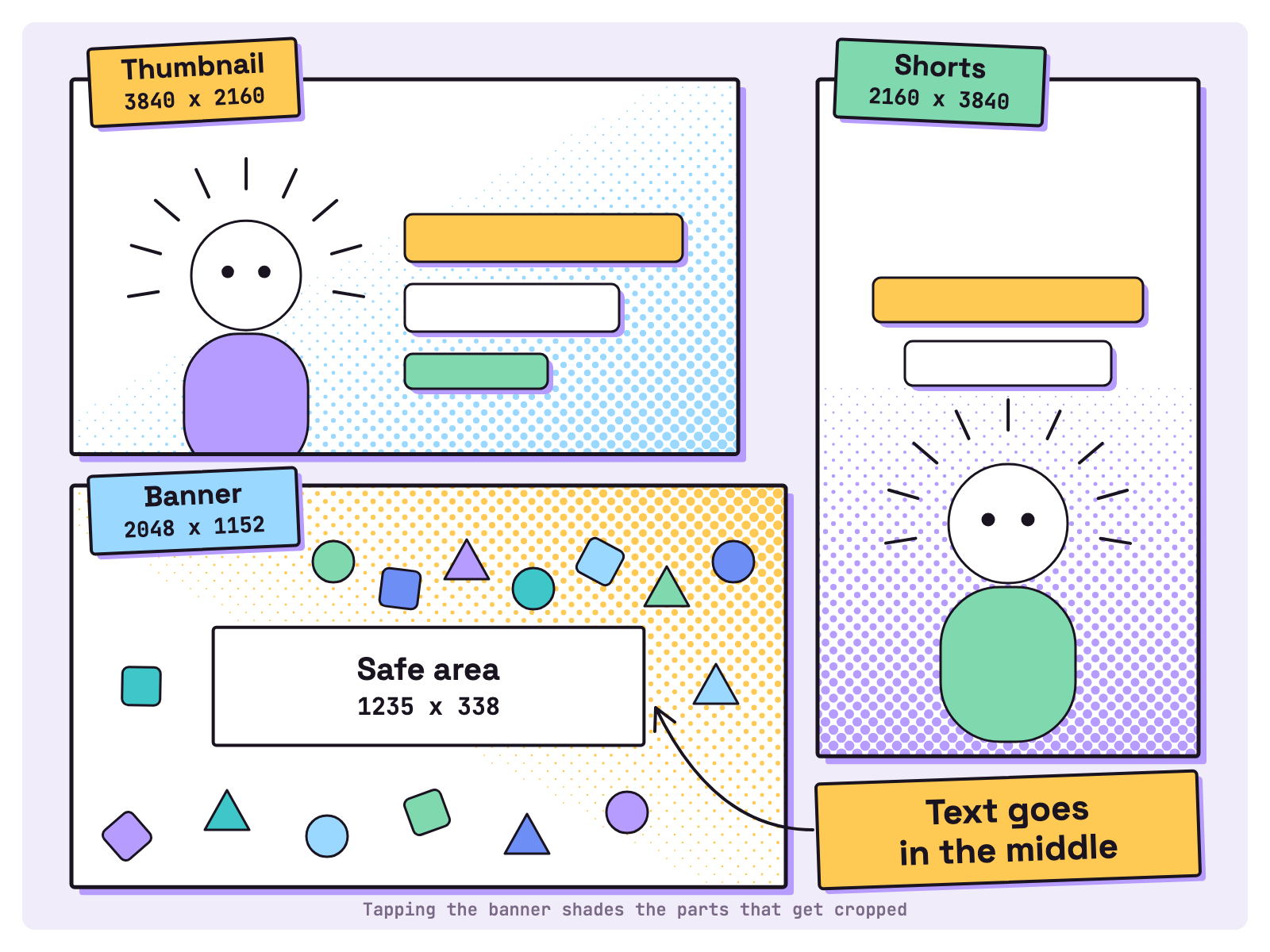
YouTube recommends 3840 x 2160 for video thumbnails and 2160 x 3840 for Shorts. YouTube’s thumbnail page, read 19 Nov 2026, also suggests a format such as JPG or PNG, 16:9 for videos and 9:16 for Shorts, and caps files at 50MB from a computer or 2 MB from mobile. Custom thumbnails need a verified account.
YouTube’s branding page sets a minimum of 2048 x 1152 at 16:9 and a 6 MB cap; at that size, text and logos go inside a 1235 x 338 safe area, because the image “will get cropped on certain views and devices”.
For vertical video, YouTube’s Shorts page takes files “Up to 3 minutes” with “a square or vertical aspect ratio”. For a GTA 6 TikTok account, check TikTok’s Help Center for its limits.
How do you write GTA 6 titles without spoilers?
Name what you did, not what happened in the story. Our rules:
- Lead with the activity: a drive, a stunt, a place, a fail.
- No character fates, no mission names, no “ending” anywhere, tags included.
- Write “no spoilers” only when it is true for every frame.
- Thumbnails too. A frozen cutscene frame is a spoiler with a border.
- Keep a spoiler word list for the title agent.
Do this: “Two hours of Vice City driving (no spoilers)”. Not that: a title asking what happens to a character, which the comments will answer for everyone.
What does the agent team prepare while you play?
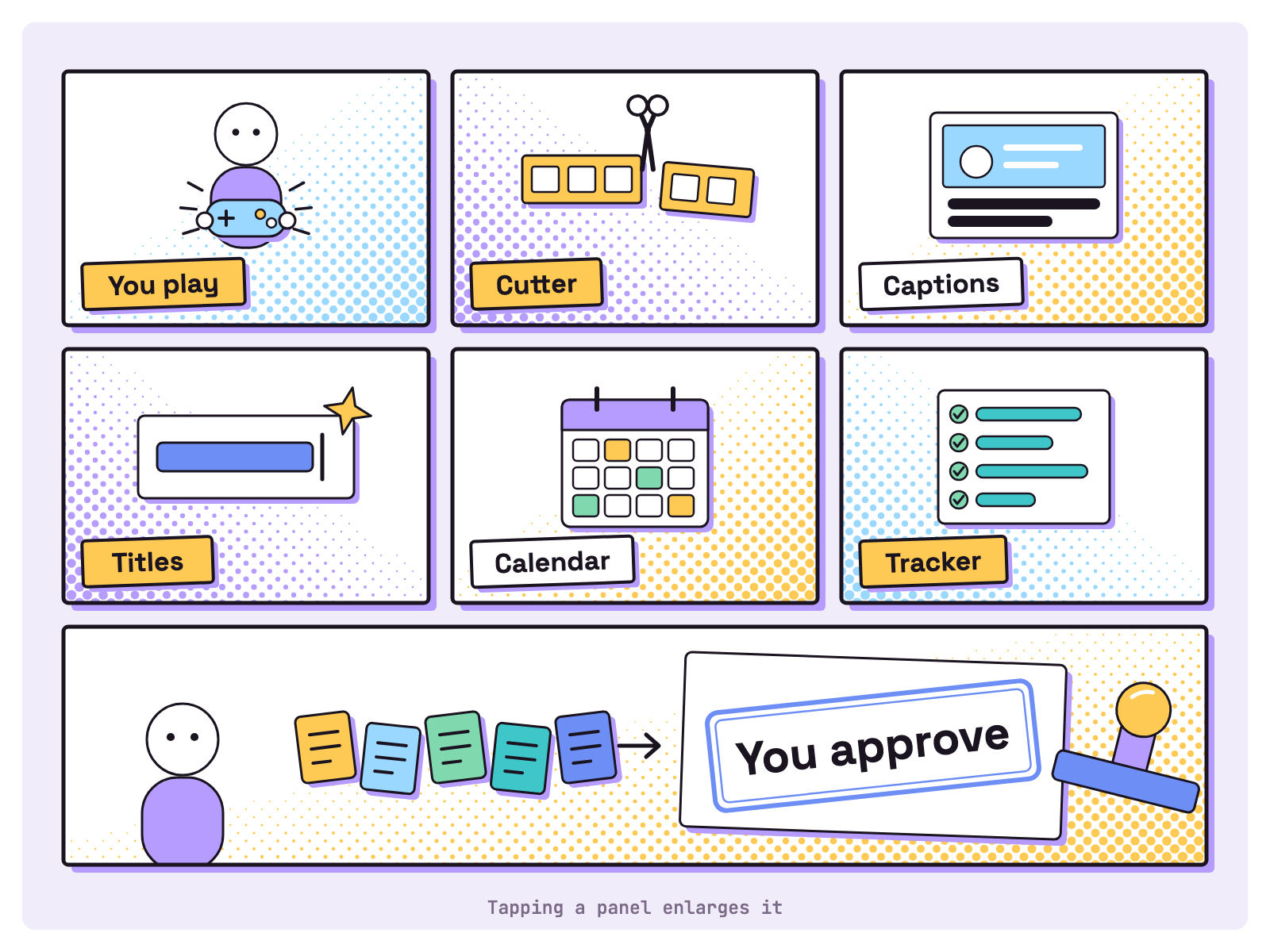
Five agents prepare; you approve. While you play and record:
- Cutter trims the moments you marked with ffmpeg and makes a vertical cut.
- Captioner turns a transcript into subtitles you correct.
- Title writer drafts titles and checks them against your spoiler list.
- Scheduler drafts a posting calendar. We think one long video and a few Shorts a week is plenty at launch.
- Tracker keeps one sheet: clip, platform, date, link and the views you paste in.
- You watch every cut, approve it and post from your own account.
ffmpeg -ss 00:12:40 -i capture.mp4 -t 30 -vf "crop=ih*9/16:ih" short_01.mp4
ffmpeg -i short_01.mp4 -vf "subtitles=short_01.srt" short_01_captioned.mp4
The first line cuts 30 seconds from 12:40 into a 9:16 slice, centred because ffmpeg’s docs say the crop’s left edge “defaults to” (in_w-out_w)/2. The second burns in captions. A coding agent such as Claude Code can run both; that is ffmpeg’s work, not a Munder Difflin feature.
Munder Difflin adds the team. Its README, read 19 Nov 2026, lists “Kanban tasks with dependencies, scheduled missions + heartbeat”, so the Captioner waits for the Cutter, and “Slack & webhooks: message a channel or POST a webhook”, so drafts reach you in Slack. harnessmd.com adds “Close your laptop and a Cloud Office keeps going”. That page also says “Pro adds the Pro workspace: an orchestrator that runs your other agents, a task board, an inbox, automations, memory, Stapler, temps and the capabilities catalog. The free plan lets you use Pro features up to a monthly allowance of work tokens.” More teams like this: every agent on our floor.
Next, give viewers somewhere to talk with our GTA 6 Discord server guide, or go live with the GTA 6 streaming setup.
FAQ
How long a clip can I save on PS5 and Xbox?
Sony's help page says a PS5 saves anywhere from the last 15 seconds up to 1 hour of recent gameplay, and a new recording runs up to 1 hour. Microsoft's page says an Xbox grabs the last 30 seconds, or up to the last 2 minutes, and Start recording runs up to 10 minutes on internal storage or 1 hour on external storage, depending on clip resolution and free space.
What size should a GTA 6 YouTube thumbnail be?
YouTube's help page, read 19 Nov 2026, recommends 3840 x 2160 pixels at 16:9 for video thumbnails and 2160 x 3840 at 9:16 for Shorts, in a format such as JPG or PNG. Uploads from a computer can be up to 50MB, from mobile 2 MB. Use your own captures, not Rockstar's art.
What size is a GTA 6 YouTube banner?
YouTube asks for at least 2048 x 1152 pixels at 16:9, recommends 2560 x 1440 for TV and caps the file at 6 MB. Keep text and logos inside the 1235 x 338 safe area, because the rest is cropped on some devices.
Can I put GTA 6 cutscenes in my clips?
tbreak and Metro reported on 4 Nov 2026 that Rockstar allows cutscenes inside a longer playthrough, such as a narrated Let's Play, and removes endings, edited cutscene compilations and isolated cinematics. We think a short clip of one cutscene counts as isolated, so keep cutscenes for full playthroughs. Read Rockstar's policy page yourself.
Do the AI agents post my videos?
Not in this kit. Agents cut, caption, draft titles, fill the calendar and keep the tracking sheet. You play, record, watch every cut, approve it and post it from your own account.