What Is NanoClaw? The Small OpenClaw Alternative That Runs Agents in Containers
NanoClaw explained on 17 Oct 2026: what the MIT licensed assistant does, how it differs from OpenClaw, how to install it and which models it works with.
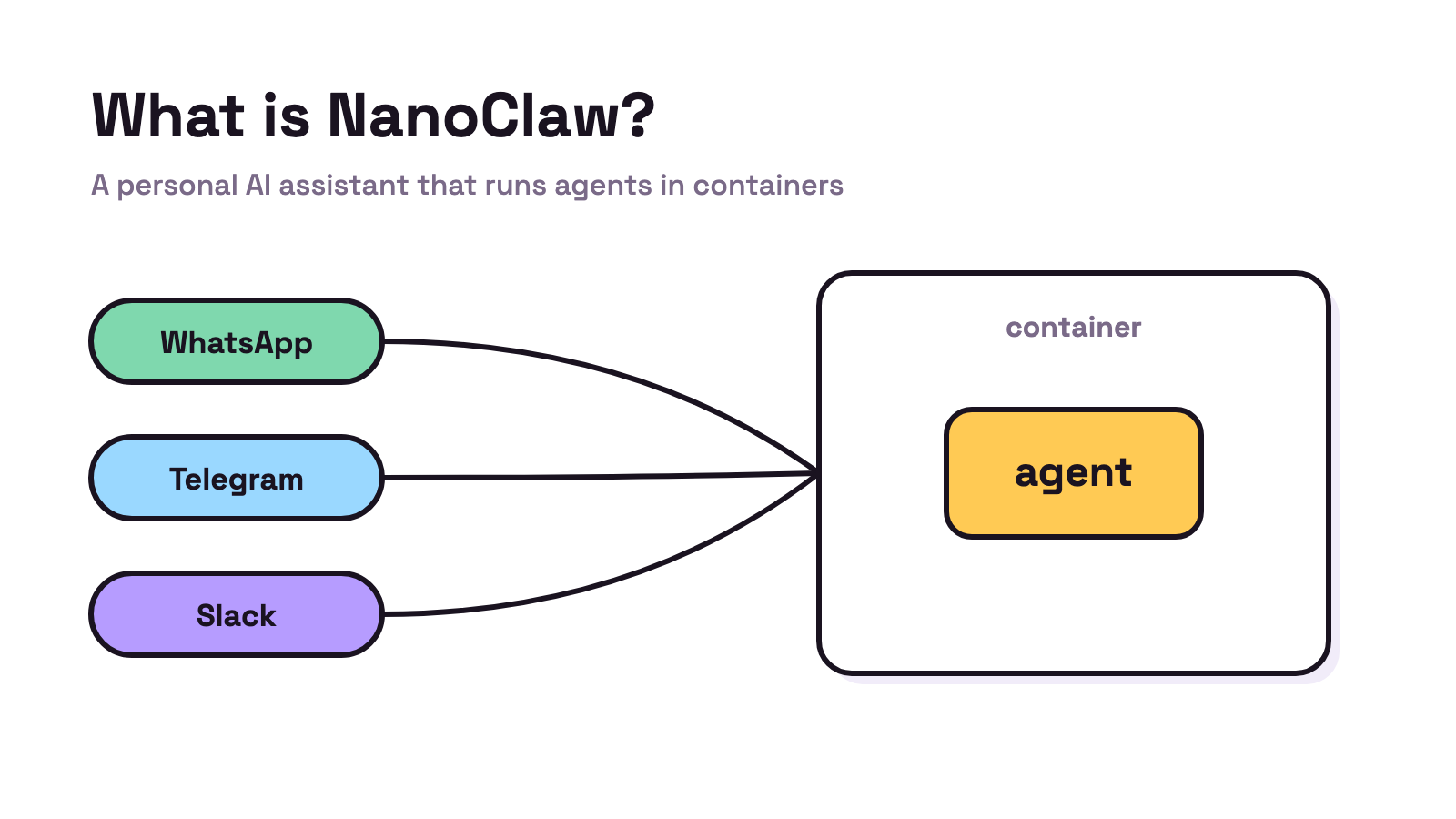
NanoClaw is a free, MIT licensed personal AI assistant that runs its agents inside Docker containers and answers you in chat apps such as WhatsApp, Telegram, Slack and Discord. Pick it over OpenClaw if you want a much smaller codebase; NanoClaw’s website says it takes “An afternoon” to understand. Checked 17 Oct 2026.
If your real work is code rather than chat, Munder Difflin is free and open source: a desktop app that runs a team of coding agents such as Claude Code, Codex and Gemini CLI on your own computer. Our OpenClaw alternatives page compares both with five other tools, and our install guide covers setup.
What is NanoClaw?
NanoClaw is a personal AI assistant that you run yourself and talk to through chat apps. The GitHub repo calls it “A lightweight alternative to OpenClaw that runs in containers for security.” The README sums it up as “An AI assistant that runs agents securely in their own containers.” You give it jobs in a chat app, it runs them in a sandbox, and it can repeat them on a schedule.
The project now ships dated releases. The notes for 2026.10.0 say it “is the first release with calendar version numbers”, and the first one that /update-nanoclaw installs by default, so updates follow published releases instead of the newest code.
| Detail | NanoClaw (17 Oct 2026) |
|---|---|
| Licence | MIT |
| Latest release | 2026.10.0, published 9 Oct 2026 |
| Default agent | Claude, through Anthropic’s Claude Agent SDK |
| Other providers | Codex, OpenCode and Ollama, added with skills |
| Runs on | macOS or Linux, Windows through WSL2 |
| Needs | Node 22+, pnpm 10+, Docker |
| GitHub | More than 30,000 stars, created 31 Jan 2026 |
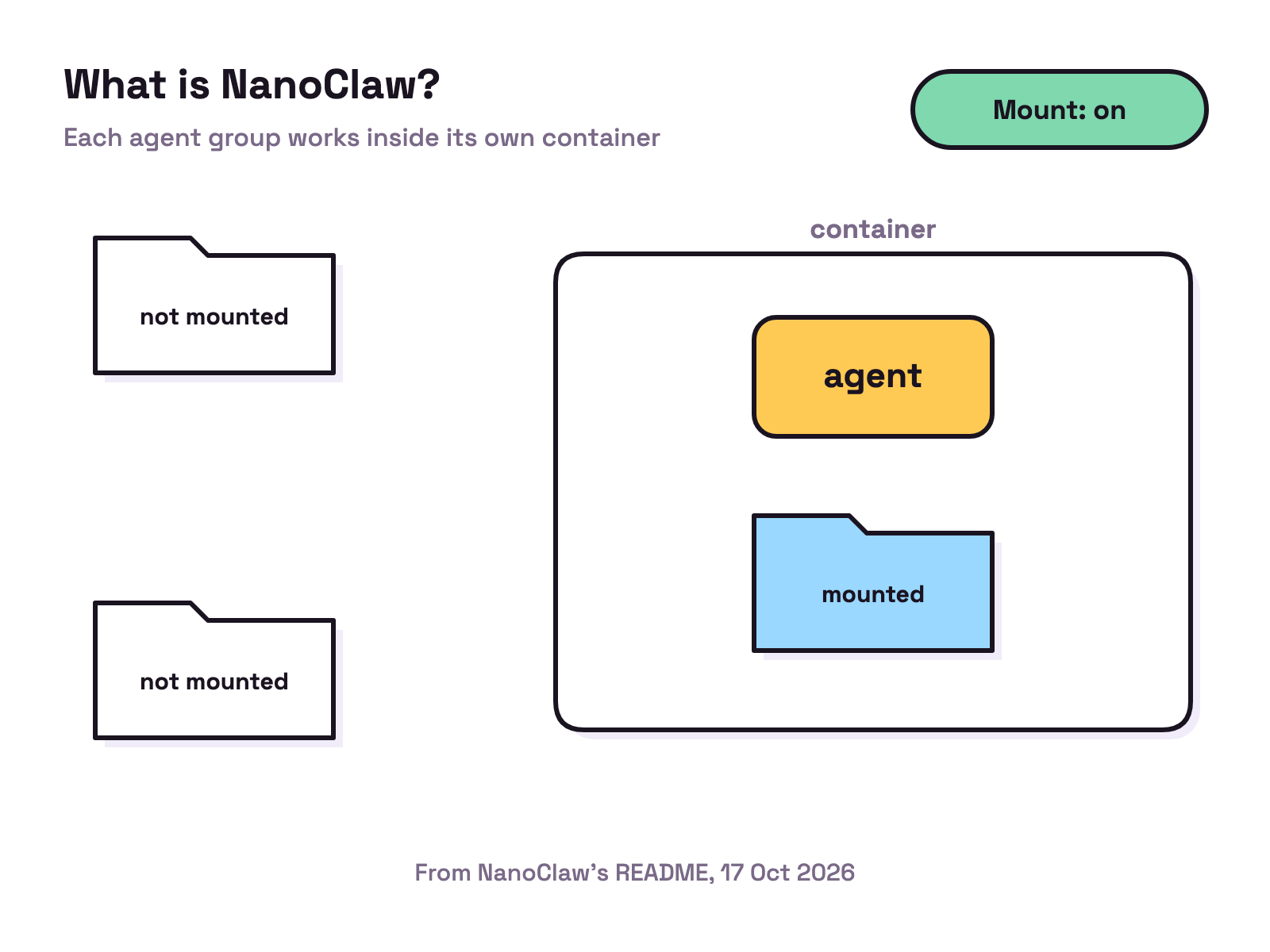
The README lists what each agent group gets: “its own CLAUDE.md, its own memory, its own container, and only the mounts you allow.” It also lists scheduled tasks, web search and fetch, and agent templates you can stamp out with one command.
How is NanoClaw different from OpenClaw?
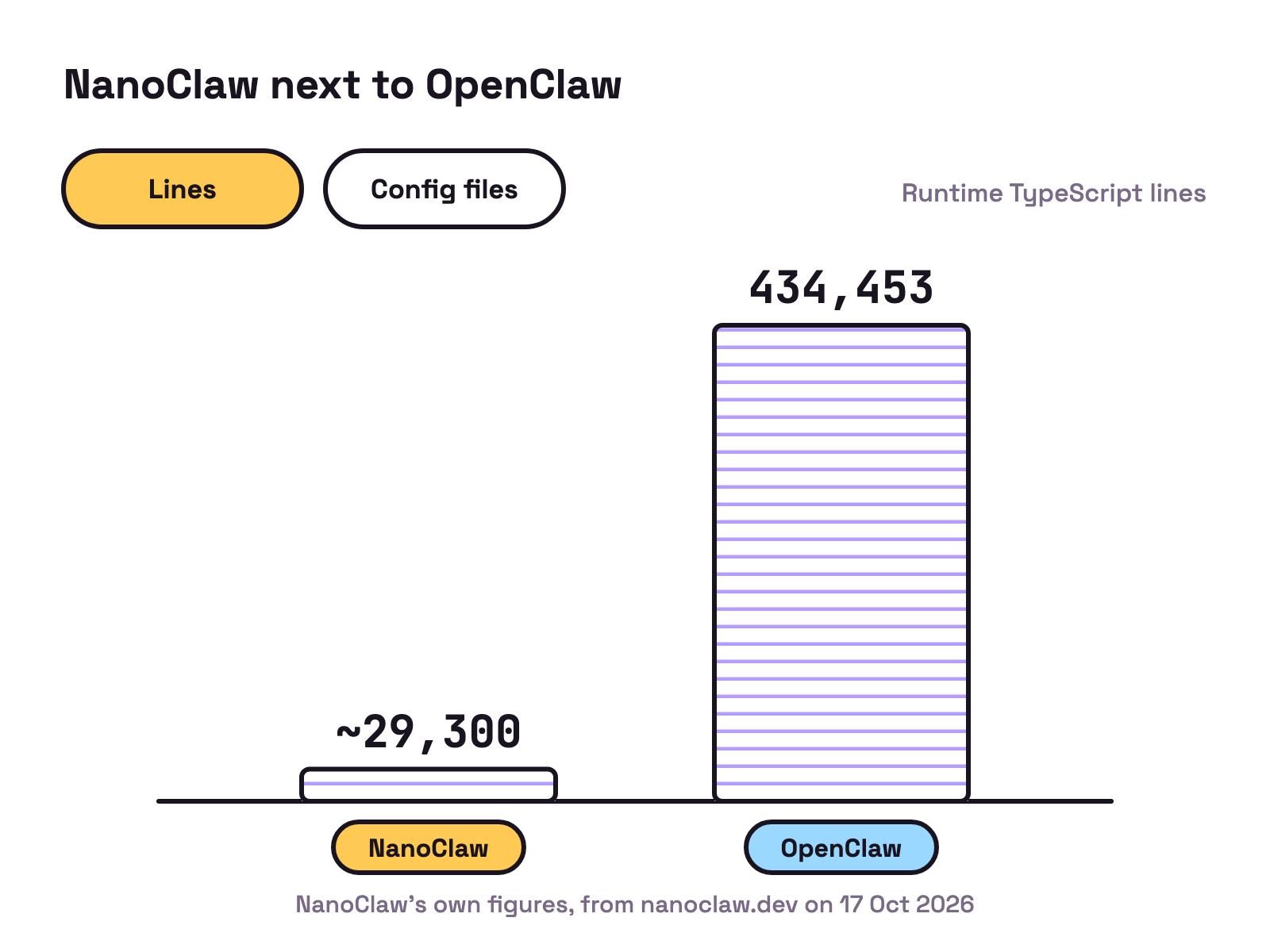
NanoClaw is the smaller of the two by design. Its website sets out these figures, which are NanoClaw’s own:
| From nanoclaw.dev, 17 Oct 2026 | NanoClaw | OpenClaw |
|---|---|---|
| Runtime TypeScript files | 200 | 3,680 |
| Runtime TypeScript lines | about 29,300 | 434,453 |
| Direct runtime dependencies | 12 | 70 |
| Manual config files | 0 | 53 |
| Security model | OS container isolation | Application level checks |
The README’s philosophy is “Customization = code changes.” There are no config files: you fork the project and ask Claude Code to change it. Channels and extra providers are not in the main code either; skills such as /add-telegram copy in only the modules you ask for.
Under the hood, the README describes one host process that routes each message to a per session agent container, with “Two SQLite files per session, each with exactly one writer”. The host writes your message to one file, the agent writes its reply to the other, and the host delivers it back to your chat app.
For a closer look at OpenClaw and one of its main rivals, see Hermes Agent vs OpenClaw.
How do you install NanoClaw?
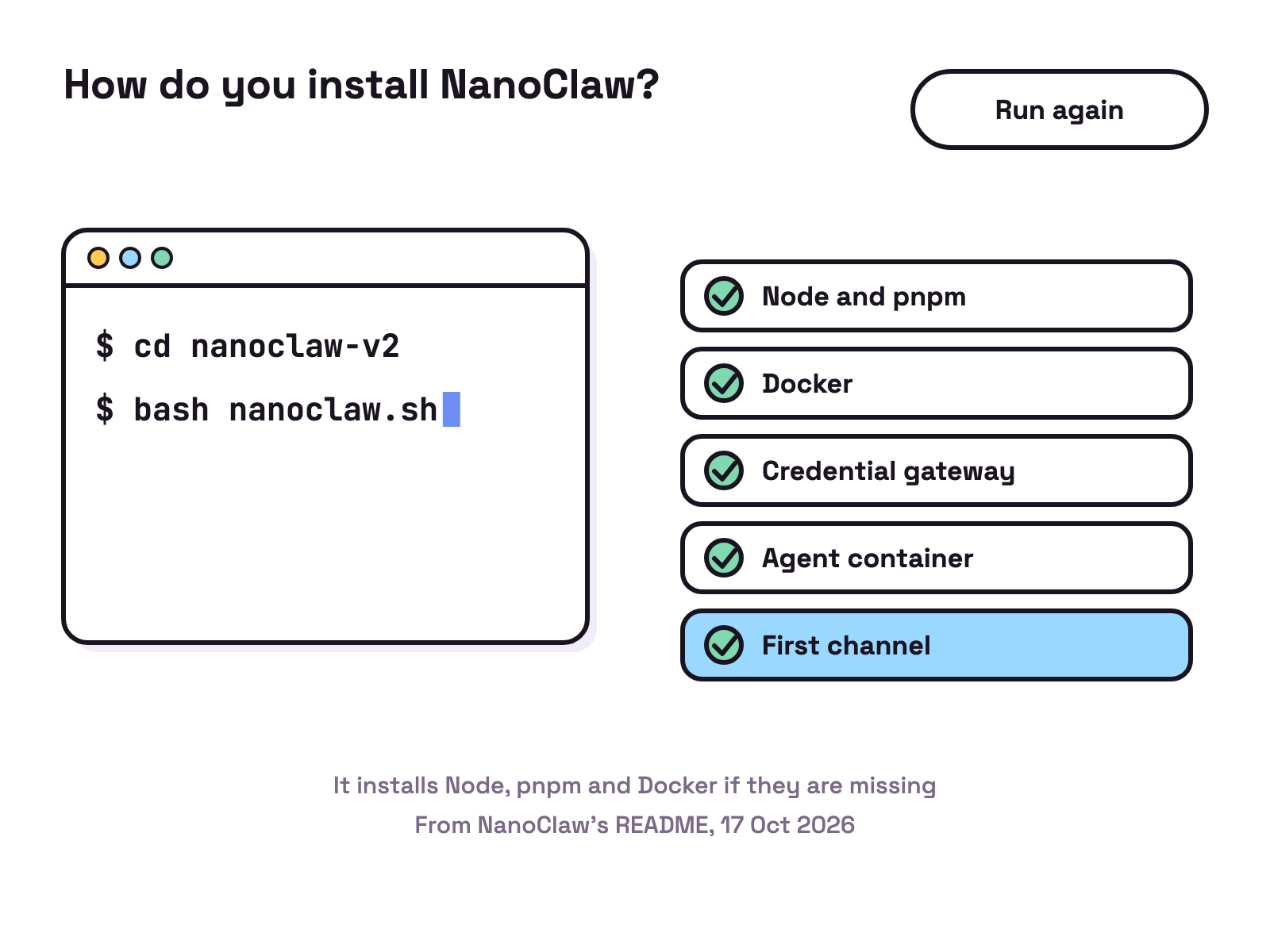
The README’s quick start is three lines:
git clone https://github.com/nanocoai/nanoclaw.git nanoclaw-v2
cd nanoclaw-v2
bash nanoclaw.sh
The README says nanoclaw.sh “walks you from a fresh machine to a named agent you can message.” It installs Node, pnpm and Docker if they are missing, installs a credential gateway and registers your Anthropic credential with it, builds the agent container and pairs your first channel. If a step fails, Claude Code is called to diagnose it and resume. To remove it, bash nanoclaw.sh --uninstall deletes only what belongs to that copy.
Which models and chat apps does it support?
Claude comes first. The README says NanoClaw “natively uses Claude Code via Anthropic’s official Claude Agent SDK”. Other providers are skills: /add-codex for OpenAI’s Codex with a ChatGPT subscription or API key, /add-opencode for OpenRouter, Google, DeepSeek and more, and /add-ollama-provider for local models through Ollama. Different agents in one install can use different backends.
For chat, the README lists WhatsApp, Telegram, Discord, Slack, Microsoft Teams, iMessage, Matrix, Google Chat, Webex, Linear, GitHub, WeChat and email through Resend. Each is installed on demand with its own /add skill.
Is NanoClaw safe to use?
Its safety case rests on isolation. The README says agents “can only access explicitly mounted directories”, and that “agents never hold raw API keys”: outbound requests go through a credential gateway that adds the key at request time. It also says “You should still review what you’re running”.
Two details are worth knowing before you install. The README says NanoClaw “has no user accounts” and by default reports only anonymous setup diagnostics, which NANOCLAW_NO_DIAGNOSTICS=1 turns off; a free account is needed only for opt in extras such as a prebuilt agent image. And the 2026.10.0 release notes tell OneCLI users to upgrade the gateway to exactly 1.42.0, “which closes a credential-injection bypass”, before updating.
Our view: NanoClaw suits someone who wants an assistant in their chat apps and is happy to run Docker and read code. If you want a team of coding agents instead, see open source AI agents.
FAQ
What is NanoClaw?
NanoClaw is a free, MIT licensed personal AI assistant. Its README describes it as an assistant "that runs agents securely in their own containers". You talk to it through chat apps such as WhatsApp, Telegram, Slack or Discord, and it runs on Anthropic's Claude Agent SDK by default.
Is NanoClaw free?
The code is free under the MIT License, and the README says NanoClaw has no user accounts. NanoClaw's website says your agent provider may charge for model usage, and that local Ollama models can run without a hosted model bill. A free account is needed only for opt in extras, such as fetching a prebuilt agent image instead of building it locally.
What is the difference between NanoClaw and OpenClaw?
Both are personal assistants you message from chat apps. NanoClaw's website compares about 29,300 lines of runtime TypeScript for NanoClaw with 434,453 for OpenClaw, and container isolation for NanoClaw with application level checks for OpenClaw. Those are NanoClaw's own figures.
Does NanoClaw work with models other than Claude?
Yes. The README says it uses Claude through the Claude Agent SDK natively, and lists /add-codex for OpenAI's Codex, /add-opencode for OpenRouter, Google, DeepSeek and others, and /add-ollama-provider for local models through Ollama.
What do you need to run NanoClaw?
macOS or Linux, or Windows through WSL2, with Node 22 or later, pnpm 10 or later and Docker. The setup script installs Node, pnpm and Docker if they are missing. Claude Code is needed for /customize, /debug, error recovery during setup and the /add channel skills.