How to Trigger Your AI Agent Hive from a GitHub Webhook
Wire a GitHub webhook to Munder Difflin: a secret-gated local endpoint turns each repo event into a task for your GOD orchestrator — POST a message, get a token, poll the result. No server to host.
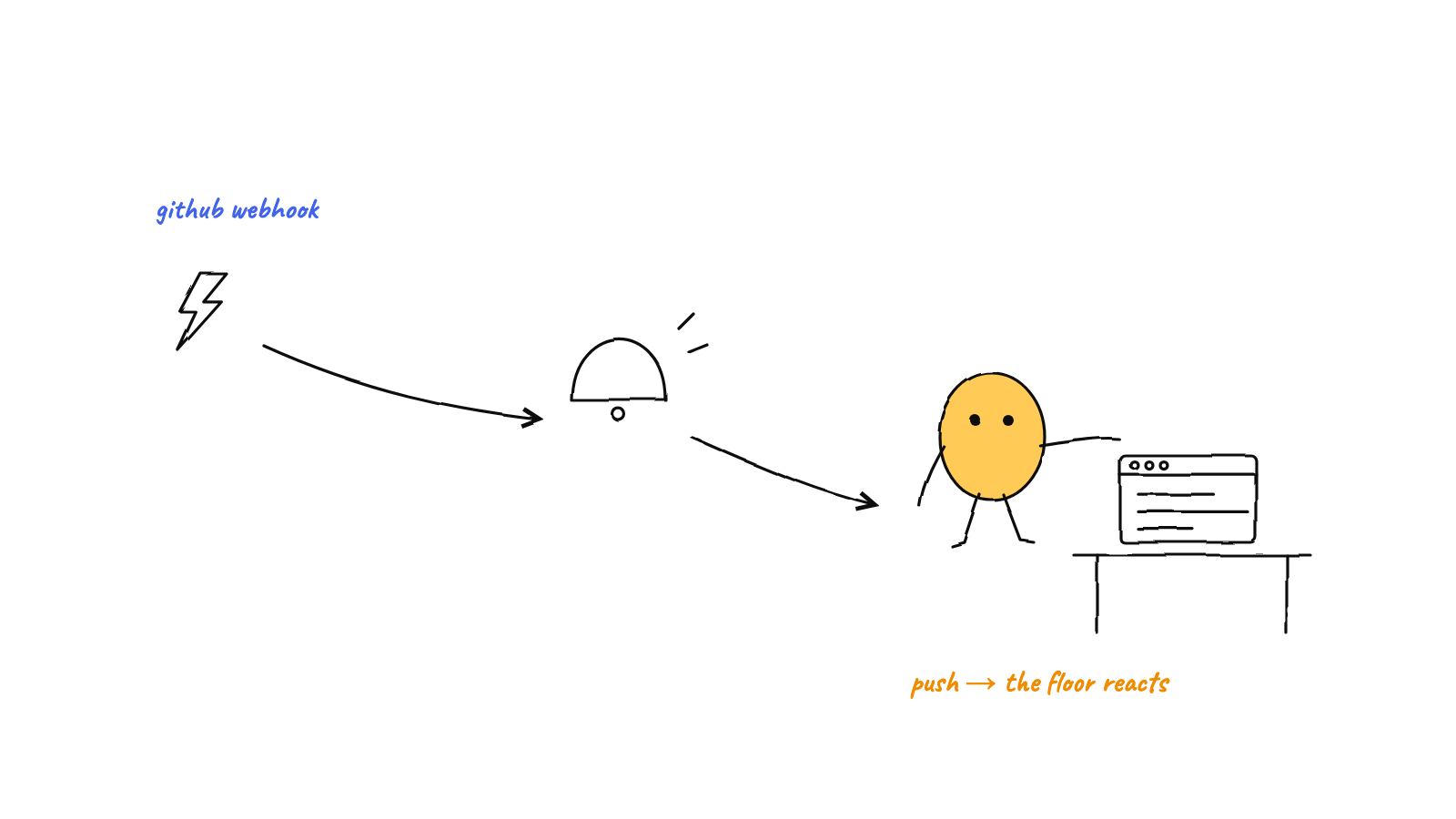
Munder Difflin can turn a GitHub
webhook into a task for your hive. Flip on the webhook trigger, copy the public URL it opens via
a local tunnel, and have GitHub (or a GitHub Action) POST { message, title? }
with your shared secret in an x-md-webhook-secret header. The GOD orchestrator files a kanban
card, routes it to an agent, and hands back a capability token you can poll for status.
The endpoint lives on your machine; the tunnel is just a doorbell. Off by default until you switch
it on.
Most of the time you brief your agents from the app. But a lot of work starts in GitHub — a PR opens, an issue gets a label, a release tag lands. Munder Difflin’s webhook trigger lets you bridge that gap: a GitHub event becomes a task in your hive’s queue, triaged and routed by the GOD orchestrator like any other piece of work. This is a hands-on walkthrough using GitHub as the concrete example, but the same endpoint accepts a POST from anything that can speak HTTP.
What the webhook trigger actually does
The contract is small and worth stating exactly, because everything downstream depends on it.
POSTto the endpoint with anx-md-webhook-secret: <your-secret>header and a JSON body of{ message, title? }. On success the message is routed to god/Michael, a stamped kanban card is created, and you get back{ ok: true, token, taskId }.GETthe endpoint withx-md-webhook-token: <token>(or?token=<token>) and you get back{ ok, status, title, result }— only for that one token’s task.
That’s the whole surface. message is the work to do (a required, non-empty string); title is an optional
label for the card. Note what is not in that body: the secret. It’s verified at the door and never forwarded
into the routed message, the card, or the response — so it can’t leak downstream.
This is inbound automation — the outside world asking your hive to do something. It’s the mirror of human-in-the-loop approvals, where an agent reaches out to a person mid-run. One starts work remotely; the other checks with you. Together they let a hive run while you’re not at the keyboard.
Step 1 — Enable the webhook trigger and get the public URL
In Munder Difflin, switch on the webhook trigger and set a shared secret (treat it like a password — long and random). When it starts, two things happen:
- A bare HTTP server binds to a local port inside the app’s main process. This is the security boundary, and it’s live the instant the port is bound.
- The app opens a best-effort local tunnel (via
tunnelmole) and hands you a public URL that forwards to that local port. That’s the URL you give GitHub.
The tunnel is non-fatal by design. If it can’t be established, the local handler keeps running and the app reports the tunnel error without a URL — so you’re never in a half-broken state where the endpoint is exposed but unguarded. The tunnel is a doorbell; it is not what keeps strangers out.
Copy the public URL. You’ll paste it into GitHub next.

Step 2 — Point GitHub at it
You have two clean ways to do this, depending on how literal you want to be.
Option A — A GitHub Action (recommended). GitHub’s native webhooks send GitHub’s own payload shape, but
our endpoint wants { message, title? }. The simplest, most accurate bridge is a one-step workflow that POSTs
exactly the body the endpoint expects. Drop this in .github/workflows/notify-hive.yml:
name: Notify Hive
on:
  pull_request:
    types: [opened, reopened]
jobs:
  ping:
    runs-on: ubuntu-latest
    steps:
      - name: POST to Munder Difflin
        run: |
          curl -sS -X POST "$HIVE_URL" \
            -H "x-md-webhook-secret: $HIVE_SECRET" \
            -H "content-type: application/json" \
            -d "{\"message\": \"Review PR #$: $ — $\", \"title\": \"PR #$\"}"
        env:
          HIVE_URL: $
          HIVE_SECRET: $
Store the public URL as the HIVE_URL repo secret and your shared secret as HIVE_SECRET (Settings →
Secrets and variables → Actions). Now every opened or reopened PR composes a one-sentence brief and posts it
to your hive. Because you author the message, you control exactly what the orchestrator is asked to do.
Option B — A raw repository webhook. If you’d rather use Settings → Webhooks, you can — but be aware GitHub
controls the payload there, and our endpoint reads only the top-level message and title strings. GitHub’s
event payload doesn’t contain those keys, so a raw webhook won’t produce a usable task on its own. Use the
Action approach when you want the hive to receive a clean, purposeful instruction rather than a raw event dump.
Tip: GitHub webhooks have their own
secretfield that signs the body with HMAC. That’s GitHub’s scheme, not ours — our endpoint authenticates on thex-md-webhook-secretheader, which the Action sets explicitly. Don’t confuse the two.
Step 3 — Confirm a triggering POST works
Before wiring CI, prove the round trip with curl:
curl -sS -X POST "https://your-tunnel-url.example" \
  -H "x-md-webhook-secret: YOUR_SECRET" \
  -H "content-type: application/json" \
  -d '{"message": "Triage the newest open issue and draft a first response.", "title": "Issue triage"}'
A good response looks like:
{ "ok": true, "token": "…192-bit token…", "taskId": "…card id…" }Hang onto that token. To check what the hive did with it, GET the same endpoint:
curl -sS "https://your-tunnel-url.example" -H "x-md-webhook-token: YOUR_TOKEN"
# → { "ok": true, "status": "…", "title": "Issue triage", "result": "…" }
The token is the only key to that task. A GET returns only the status, title, and result for the one task
it maps to — it can’t list or enumerate any other work. An unknown token gets the same 404 as a malformed
one, so a probe can’t tell “valid but unknown” from “wrong shape.”
What the hive does with it
Once a POST passes the secret check, the handler hands { message, title } to the app, which routes the
message to god/Michael — the orchestrator’s inbox — and files a stamped kanban card. From there it’s
just another task: the orchestrator reads it, decides who should handle it, and dispatches to the right agent,
exactly like work that arrives through the hive’s normal message
routing. A reviewer agent might read the PR; a writer might draft the
issue response. The webhook doesn’t pick the agent — it just gets the work onto the board.
Security, in one breath
A public endpoint that can enqueue work for autonomous agents is exactly what you don’t want strangers poking, so the handler treats every request as hostile until proven otherwise:
- Secret-gated, constant-time. A POST must carry the exact secret in
x-md-webhook-secret, compared in constant time. A length mismatch fails immediately. - Authenticate before buffering. The secret is checked before the request body is read, so an unauthenticated peer can’t make the server buffer anything (within the cap).
- Bounded before any work. A 1 MB body cap and a fixed-window rate limit (120 requests/minute, globally — the remote IP is the tunnel’s, so per-IP would be meaningless) reject abuse ahead of any parse or crypto.
- Capability tokens, not listings. The 192-bit token a POST returns is unguessable, and a GET scoped to it reveals only that single task.
The secret stays local and is never logged, echoed, or forwarded. The principle is the one every trust boundary should follow: authenticate at the edge, fail closed, keep verification cheap and constant-time.
Why this fits a local-first hive
It would’ve been easier to host this as a cloud function. Doing it as a local endpoint is the point. Your agents, their memory, and your git history never leave your machine — GitHub is only a trigger, a thin remote surface for starting and watching work. Nothing to deploy, nothing to pay for, no third party sitting between a repo event and your code. It’s the same philosophy behind local-first orchestration: keep the control plane on your box, and let the outside world knock politely at the door.
Pair it with scheduled missions and the picture rounds out: timers put recurring work in the queue, GitHub puts event-driven work in the queue, and the orchestrator runs both — whether or not you’re watching.
FAQ
Can you trigger an AI agent from GitHub? Yes — point a GitHub Action’s curl (or any HTTP client) at the
webhook URL with your secret in x-md-webhook-secret and a { message, title? } body, and the orchestrator
files a card and routes it to an agent.
Is it secure? The secret is checked in constant time before the body is buffered, a 1 MB cap and a 120/minute rate limit bound abuse first, and the POST returns a 192-bit capability token whose GET reveals only that one task. The secret is never logged or forwarded.
Do I need a public server? No. The endpoint runs locally; a best-effort tunnel gives GitHub a URL to reach it, and the handler runs even if the tunnel doesn’t.
Munder Difflin turns a GitHub event into a remote control for a hive that still lives entirely on your machine — orchestrated by GOD, verified at the edge, queued like any other task. Download Munder Difflin to wire your repo into your agents; it’s free and open source.
FAQ
Can you trigger an AI agent from a GitHub webhook?
Yes. Munder Difflin runs a small, opt-in local webhook that turns an inbound POST into a task. Point a GitHub webhook (or a one-line curl from a GitHub Action) at the public URL with the shared secret in an x-md-webhook-secret header and a JSON body of { message, title? }, and the GOD orchestrator picks it up, files a kanban card, and routes it to an agent.
Is the Munder Difflin webhook secure?
It's built to be. Every POST must carry your shared secret in x-md-webhook-secret, compared in constant time, and the secret is verified before the body is even buffered. A 1 MB body cap and a fixed-window rate limit (120 requests/minute) bound abuse ahead of any parsing. The response hands back a 192-bit capability token; a GET reveals only that one task's status — no listing, no enumeration.
Do I need to host a public server to receive GitHub webhooks?
No. The endpoint runs on your own machine inside the desktop app. A best-effort local tunnel (tunnelmole) gives GitHub a public URL to reach your local port, so there's nothing to deploy. If the tunnel can't start, the local handler still runs — the tunnel is a doorbell, not the security boundary.